
- The sales monitoring system is an integration of well-defined metrics, review and the right tools so that one can identify any issues and address them in time.
- It consists of five levels which include sales activity, pipeline and deals, lead and prospects, revenue compared to objectives and customers.
- Begin with three to five metrics and a baseline of two weeks before setting the targets. There are six steps involved in creating this system.
- Review of activities should be done on a daily basis, pipeline on a weekly basis, revenue on a monthly basis, and customers' metrics on a quarterly basis.
- The sales team will accept the monitoring system if it is transparent, hence share the dashboards with your team and use the data for coaching.
A sales monitoring system is the combination of metrics, review routines and software a business uses to track sales activity (calls, emails, meetings, follow-ups), pipeline movement and results as they happen, so managers can spot problems early and coach their sales team. The most reliable systems capture this data automatically from the tools your team already uses, instead of relying on manual entries.
Sales Monitoring Systems help businesses monitor every sales activity, measure team productivity, analyze customer interactions, and improve conversion rates. Whether you manage telecallers, field sales representatives, or inside sales teams, the right sales monitoring software provides real-time visibility into performance and helps managers make data-driven decisions.
Your sales team is working hard, leads are coming in, and deals are closing.
But here’s a question: how are you keeping track of it all? Do you know what’s driving those numbers?
Sales monitoring isn’t just about looking at spreadsheets or hitting a few targets, it’s about understanding the full picture of your sales process.
It’s like having a personal fitness tracker, but it helps you measure progress, identify weaknesses, and take action for your business.
Let’s get real and practical in this guide.
I’ll explain what a sales monitoring system actually tracks, walk you through a 6-step process to set one up, break down the 12 metrics that matter, share an example of how a sales manager uses this data to coach their team, and introduce you to Callyzer, a tool that can do the heavy lifting for you.
Ready? Let’s jump in!
What Exactly Is Sales Monitoring?
Think of sales monitoring as the backbone of your sales strategy. It’s all about tracking your sales rep actions, behaviors, and results and analyzing how these factors contribute to your business goals.
Here’s why it’s crucial: sales monitoring isn’t just for accountability, it’s for optimization. It helps you determine which strategies are working and which need a reboot. Without it, you’re left guessing why last month’s numbers went up or down.
When you combine these tracking habits, regular reviews and the right tools in a repeatable way, you get a sales monitoring system. The rest of this guide will walk you through how to build it.
What Is a Sales Monitoring System?
A sales monitoring system is a repeatable setup for monitoring sales activity and results. It isn’t a single tool. It has three parts:
- Metrics: the 5–12 numbers you agree to monitor, each with a clear formula.
- Review rhythm: when each number gets checked (daily, weekly or monthly) and who checks it.
- Tools: where the data comes from, whether that’s a spreadsheet, a CRM, call tracking software, or a mix.
For a team of 2–3 reps, a shared spreadsheet and a weekly review can work. Once you have more than a handful of reps, or anyone working remotely or in the field, manual logs start to break down. Entries get skipped, numbers get rounded up, and you only see problems after the month is over. That’s usually when teams move to software that captures activity automatically.

Sales Monitoring vs Sales Tracking vs Sales Reporting
These terms overlap, and many teams use them interchangeably. Here’s how to distinguish between the two in practice:
| Term | What it means | Example | Question it answers |
|---|---|---|---|
| Sales tracking | Capturing sales activities and results as they happen | Logging calls, emails, meetings, deal stages and closed sales | What happened, and how much? |
| Sales monitoring | Reviewing that data on an ongoing basis against goals, so you can spot issues and act during the period | Noticing a salesperson’s response rate has dropped this week and stepping in | Are we on track right now? |
| Sales reporting | Compiling and presenting sales data for a set period, for decision-makers | A monthly sales performance report for leadership | How did we perform over the period? |
In short: tracking captures the data, monitoring reviews it as you go, and reporting summarizes it afterwards. A good sales monitoring system does all three.
What Does a Sales Monitoring System Track?
Most systems monitor five layers of the sales process. Team activity and pipeline movement show what’s happening now. Lead behavior shows how prospects are responding. Revenue and customer data show whether it’s all working.
| Layer | What you monitor | Example signals | Review cadence |
|---|---|---|---|
| 1. Sales team activity | The effort your sales team puts in | Calls, emails, meetings and visits completed, follow-ups done, time spent selling | Daily |
| 2. Sales pipeline and deal movement | How deals move through each stage | New deals added, stage movement, stalled deals, total pipeline value | Daily / weekly |
| 3. Lead and prospect behavior | How leads and prospects respond | Response and reply rates, engagement with emails, demos or proposals, lead source quality | Daily / weekly |
| 4. Revenue and goal tracking | Results against your targets | Revenue vs target, lead-to-deal conversion, average deal size | Weekly / monthly |
| 5. Customer metrics and market insights | What happens after the sale, and what customers tell you | Retention, repeat purchases, customer lifetime value, common objections, competitor mentions | Monthly / quarterly |
Lead and pipeline data are far easier to monitor when every lead and deal sits in one place, which is one of the main benefits of a lead management system.
Most sales lead management software also shows how long each lead has been waiting, which makes stalled deals easy to spot.
Inside Sales vs Field Sales Monitoring: What Changes?
Every sales team has its own approach to selling. Inside sales teams sell remotely, by phone, email or video calls. Field sales teams meet customers in person, visiting shops, offices or homes. The five layers above apply to both, but what you monitor and where the data comes from are different:
| Inside sales (remote) | Field sales (in person) | |
|---|---|---|
| Daily work pattern | Talks to many leads a day by phone, email or video, and follows up with them regularly | Meets fewer customers a day, but spends more time with each one in person |
| Main activity signals | Calls, emails, video meetings, response rates | Customer visits, meetings held, orders taken |
| Where the data comes from | Phone, email and calendar activity, CRM | Visit check-ins, visit reports, CRM, calls |
| Biggest blind spot | Activity logged by hand that didn’t happen or was very brief | Visits that are reported but can’t be verified |
| Review rhythm | Daily activity check, weekly coaching | Daily check-in, weekly pipeline review |
In short: don’t compare a field salesperson’s 6 visits with an inside salesperson’s 60 calls. Judge each person against the signals that fit how they sell.
Why Does Sales Monitoring Matter?
Let’s keep it simple: without monitoring, you’re essentially driving blind. Here’s how monitoring transforms your sales game:
1. Spot Opportunities and Weaknesses
Think about noticing a drop in sales conversions early, before it seriously impacts your revenue. That’s the advantage of monitoring. It helps you spot problems and improve your sales process in time to avoid bigger setbacks.
2. Boost Team Productivity
When your team knows what’s being tracked (and why), they work smarter, not harder. Monitoring tools can help identify where their time is best spent, like focusing on high-quality leads instead of chasing cold ones.
3. Stay Agile
Markets change, customer preferences shift, and new competitors emerge. Monitoring keeps you ahead of the curve, helping you adapt quickly to whatever comes your way.
How to Monitor Sales: A 6-Step Process
Here’s a simple process you can use whether you’re setting up sales monitoring for the first time or improving the one you already have.
Step 1: Start With One Goal and 3–5 Leading Indicators
Pick the one outcome that matters most this quarter, then choose the 3–5 activities that drive it. For example, if the goal is more closed deals, the leading indicators might be qualified meetings booked, follow-ups completed on time, and proposal-to-close rate. A good mix includes at least one indicator each from team activity, pipeline movement and lead behavior. Leading indicators move before revenue does, so they give you time to act.
Step 2: Collect a Baseline Before Setting Targets
Track your chosen metrics for about two weeks before setting any targets. Targets based on your team’s real averages feel fair and achievable. Targets copied from somewhere else usually feel arbitrary, and reps stop taking them seriously.
Step 3: Decide What to Check Daily, Weekly and Monthly
Not every layer needs daily attention. Match each one to how fast you can act on it:
| Cadence | Layers to review | Typical metrics |
|---|---|---|
| Daily | Sales team activity; lead and prospect behavior | Activities completed, follow-up rate, speed to lead, lead response rate |
| Weekly | Sales pipeline and deal movement | Pipeline value, stage movement, stalled deals, lead-to-deal conversion |
| Monthly | Revenue and goal tracking | Revenue vs target, revenue growth, sales cycle length |
| Quarterly | Customer metrics and market insights | Retention, customer lifetime value, common objections, competitor mentions |
Step 4: Automate Data Capture
Self-reported data is the weakest part of most monitoring setups. Salespeople forget to log activity, round numbers up, or update the CRM at the end of the day from memory.
Wherever possible, capture activity automatically: calls from the phone, emails from the inbox, meetings from the calendar, and stages from your CRM.
Automated data is only as useful as the stages it maps to, so clearly defined stages are the foundation of good sales process management.
Step 5: Build a Simple Review Rhythm
Data only helps if someone looks at it at the right time and acts on it. Most teams do well with three short, regular check-ins, each with a different job:
- Daily huddle (10 minutes, whole team): A quick stand-up at the start of the day. Look at yesterday’s activity and lead responses, flag any new leads still waiting for a first contact, and agree on today’s priorities. Keep it short and forward-looking; this isn’t the place to discuss individual performance.
- Weekly one-on-one (15–20 minutes per salesperson): A private conversation between the manager and each salesperson. Go through their open deals, look at any red flags in their numbers, and agree on one specific thing to improve that week. One clear action works better than a long list of feedback.
- Monthly team review (45–60 minutes): A step back to look at results. Compare revenue and conversion against targets, spot trends across the month, and check whether the targets themselves still make sense. It’s also a good time to share what top performers are doing differently.
Once a quarter, add a review of customer metrics such as retention and lifetime value, along with what customers are saying about pricing, objections and competitors.
The exact timings matter less than consistency. Short, regular monitoring of sales activity every week is more useful than a detailed review that keeps getting cancelled.
Step 6: Turn Red Flags Into Coaching Actions
Monitoring is only useful if it leads to a change. When a number looks off, ask why before you act. For example:
- Lots of activity but little pipeline movement usually means effort is going to the wrong leads, or conversations stall early. Review a few recent calls, emails or meeting notes to see where prospects drop off. For phone-heavy teams, a stronger opening built from tested sales call script templates often fixes early drop-offs.
- Good engagement but low conversion often points to weak objection handling, unclear proposals or poorly qualified leads. Reviewing sales call performance call by call shows exactly where conversations lose momentum.
- Low response rates across the whole team suggest a timing, messaging or lead-quality problem, not a people problem. On the phone, the usual fixes for low call pickup rates start with calling at better times and cleaning the lead list.
Sales Performance Monitoring: 12 Key Sales Metrics You Shouldn’t Ignore
Now that we know why sales monitoring matters, let’s talk sales metrics. Here are the ones you absolutely need to track:
Together, these metrics cover all five layers: activity metrics for your sales team’s activity, conversion and lead metrics for pipeline movement and lead behavior, revenue metrics for goal tracking, and customer metrics for customers and market insights.
1. Revenue Metrics
- Total Sales Revenue: The total income your sales activities generate.
- Revenue Growth Rate: Are you moving forward or stalling?
2. Activity Metrics
- Calls Made and Emails Sent: A clear picture of your team’s activity levels.
- Follow-Up Rates: How often is your team reconnecting with leads?
3. Conversion Metrics
- Lead-to-Deal Conversion Rate: How effectively are you turning prospects into paying customers?
- Sales Cycle Length: How quickly can your team close a deal?
4. Customer Metrics
- Customer Retention Rates: Are your customers sticking around?
- Customer Lifetime Value (CLV): What’s the long-term revenue potential of a single customer?
5. Lead and Pipeline Metrics
- Speed to Lead: How long does a new lead wait before anyone contacts them?
- Lead Response Rate: What share of leads reply, pick up or engage after you reach out?
- Pipeline Value: How much potential revenue is sitting in open deals right now?
- Stalled Deals: How many deals haven’t moved to a new stage in the last two weeks?
These numbers aren’t just sales data points but insights into your business health.
Sales Metrics Cheat Sheet: Formulas, Review Frequency and Red Flags
Use this table as a quick reference for all 12 metrics. For each one, it shows how to calculate it, how often to check it, and the warning sign to look out for (the “red flag”).
Most red flags are written as changes rather than fixed numbers, because what counts as “good” depends on your product, price and market. A 10% response rate might be normal for one team and worrying for another.
So compare each metric with your own team’s usual numbers, the baseline you collected in Step 2.
For example, if your follow-up rate is normally around 85% and drops to 65% for two weeks in a row, that’s a red flag, even if another company would be happy with 65%.
| Metric | Formula | Check | Red flag | Layer |
|---|---|---|---|---|
| Total sales revenue | Sum of closed deal value in the period | Monthly | Below target two periods in a row | Revenue and goals |
| Revenue growth rate | (This period − last period) ÷ last period × 100 | Monthly | Flat or negative for two months | Revenue and goals |
| Sales activities (calls, emails, meetings) | Count per salesperson per day | Daily | Sudden drop vs the person’s own baseline | Team activity |
| Follow-up rate | Follow-ups done on time ÷ follow-ups scheduled × 100 | Daily | Falling week over week | Team activity |
| Speed to lead | Time from lead arrival to first contact | Daily | New leads waiting hours for a first response | Team activity |
| Lead response rate | Leads that respond ÷ leads contacted × 100 | Weekly | Falling across all channels | Lead behavior |
| Lead-to-deal conversion | Deals won ÷ leads worked × 100 | Weekly | Dropping while activity stays flat | Pipeline |
| Pipeline value | Sum of open deal values | Weekly | Shrinking, or too small to hit next month’s target | Pipeline |
| Stalled deals | Deals with no stage change in 14+ days | Weekly | Count growing week over week | Pipeline |
| Sales cycle length | Average days from first contact to close | Monthly | Rising for two months or more | Pipeline |
| Customer retention rate | (Customers at end − new customers) ÷ customers at start × 100 | Quarterly | Falling quarter over quarter | Customers and market |
| Customer lifetime value | Average purchase value × purchase frequency × customer lifespan | Quarterly | Falling while acquisition cost rises | Customers and market |
Outside numbers are only a rough guide, since every team’s baseline is different. For phone-based outreach, recent cold calling statistics for India show what typical response and conversion rates look like.
Which Sales Cycle Metrics Should You Monitor?
If deals are taking longer to close, these five metrics show where they’re getting stuck:
- Sales cycle length: average days from first contact to closed deal.
- Stage conversion rate: the share of leads that move from one stage to the next.
- Stage aging: how many days leads sit in each stage before moving or dropping out.
- Win rate: deals won ÷ deals that reached a decision (won + lost) × 100.
- Touches to close: the average number of calls, emails, meetings and follow-ups before a deal closes.
Pro Tips to Master Sales Monitoring
Here’s where things get practical. As a sales manager you want monitoring to be effective but also easy to manage, right? Let’s talk strategies:
1. Prioritize Metrics That Align With Goals
It’s tempting to track everything, but let’s face it, that’s overwhelming. Focus on the numbers that directly impact your objectives. For example, if growth is your priority, revenue growth and lead conversion rates should be front and center.
2. Make Sales Data Accessible to Your Team
Your sales team is on the front lines. Share key sales reports with them to keep everyone aligned and motivated. Use dashboards to give them real-time visibility into their performance.
3. Automate the Boring Stuff
Nobody wants to spend hours logging calls or updating spreadsheets. Invest in tools that automate data collection and reporting so your team can focus on selling.
4. Compare Reps to Their Own Baseline First
Ranking every rep against the top performer can demotivate the rest of the team. Comparing each rep to their own numbers from last week or last month shows real improvement or decline, and it makes coaching conversations feel fair.
How to Monitor a Sales Team Without Micromanaging
Monitoring works best when reps see it as support, not surveillance. A few habits make the difference:
- Explain what you monitor and why, before you start. When people know what’s being tracked and why, they’re much more likely to accept it.
- Give reps the same dashboard you see. When people can see their own numbers, they often fix problems before you need to step in.
- Monitor outcomes and patterns, not every minute. A weekly trend tells you more than a single slow afternoon.
- Coach in private, celebrate in public. Use the data for one-on-one coaching, and share wins with the whole team.
- Be clear about consent. Tell customers when calls may be recorded, put employee monitoring in a written policy, and handle personal data in line with India’s Digital Personal Data Protection Act, 2023. Check specifics with a legal advisor.
These habits matter even more when you manage a remote telecalling team, because salespeople can’t see day to day how the data is being used.
Example: Monitoring a 15-Person Inside Sales Team
Here’s how this looks in practice. The numbers below are illustrative, from a hypothetical team, but the patterns are ones sales managers see all the time. Activities include calls, emails and meetings.
| Salesperson | Activities / day | Response rate | Meetings / week | Deals / week | What it signals | Action |
|---|---|---|---|---|---|---|
| A | 90 | 8% | 2 | 1 | Lots of outreach, little engagement | Review messaging and lead list |
| B | 40 | 25% | 8 | 5 | Strong engagement with fewer touches | Share approach in the team huddle |
| C | 70 | 20% | 7 | 1 | Meetings aren’t turning into deals | Review proposals and post-meeting follow-up |
Looking only at activity, Salesperson A would seem like the top performer. Looking across the layers, Salesperson B is closing five times as many deals with less than half the activity, and Salesperson C has a pipeline problem, not an activity problem. That’s the value of monitoring several layers together instead of a single activity count.
What the sales manager does that week:
- Monday: the morning huddle flags A’s low response rate and C’s meetings that aren’t turning into deals.
- Wednesday: one-on-ones. A reviews outreach messages and the lead list with the manager. C walks through two recent proposals to see where deals stall.
- Friday: compare each salesperson to their own Monday numbers, not to each other, and decide whether the changes are working.
How to Overcome Common Monitoring Challenges
Let’s tackle the common roadblocks that might slow you down:
Challenge 1: Too Much Data
Ever feel like you’re drowning in information? That’s a common struggle.
Solution: Narrow your focus. To start, stick to 3-5 key metrics. Expand once you’ve mastered the basics.
Challenge 2: Resistance From Your Team
Some team members might see monitoring as micromanagement.
Solution: Reframe it as a tool for growth. Show them how monitoring benefits them, not just the company.
Challenge 3: Lack of Consistency
It’s easy to monitor sporadically and lose sight of trends.
Solution: Schedule regular check-ins to review metrics and discuss progress.
Challenge 4: Fake or Inflated Activity Logs
When salespeople log their own activity, some entries are calls that never happened, meetings that were rescheduled, or follow-ups that were never sent.
Solution: Capture activity automatically from phones, inboxes and calendars instead of relying on manual entries, and check outcomes like responses and meetings held, not just activity counts. A regular sales call audit, where managers review a sample of calls each week, catches these gaps early.
Challenge 5: Data Scattered Across Tools
Calls happen on phones, leads live in a CRM, and follow-ups happen on WhatsApp, so no one sees the full picture.
Solution: Pick one source of truth for each metric and connect your tools where you can, so the numbers you review come from one place. Cloud-based tools help here by turning call logs into insights the whole team can see in a shared dashboard.
Spreadsheet vs Software: When Should You Switch?
Both can work. The right choice depends on your team size and how much you can trust manually entered data.
| Spreadsheet / manual logs | Sales monitoring software | |
|---|---|---|
| Best for | Very small teams (a few salespeople in one office) | Growing, remote or multi-location teams |
| How data gets in | Salespeople type it in | Captured automatically |
| Accuracy | Depends on memory and honesty | Reflects actual activity |
| When you see problems | End of day or end of week | Same day, often in real time |
| Activity history | Often incomplete | Calls, emails and meetings logged automatically |
| Cost | Free | Per-user or per-device subscription |
Signs it’s time to switch to sales team monitoring software: you have more than a handful of salespeople, some work remotely or in the field, or your logged activity doesn’t match the results you’re seeing.
How to Choose Sales Monitoring Software: 6-Point Checklist
- Automatic activity capture: does it log calls, emails and meetings without anyone entering them by hand?
- Fits how your team sells: does it work with the channels you use, such as phone, email, WhatsApp or field visits?
- Real-time dashboards and alerts: can you see today’s activity today, not next week?
- Privacy and consent controls: can you review activity for coaching while respecting customer and employee consent?
- CRM integration: does it connect with the CRM your team already uses?
- Pricing model and data security: is it priced per user or per device, and where is your data stored?
Callyzer: Smarter Sales Monitoring Software Built for Calling Teams
Let’s discuss Callyzer, a powerful sales monitoring tool revolutionizing how businesses track their sales activities. If you’ve been looking for a way to simplify the monitoring process and gain actionable insights, this tool might be your best ally.
What Makes Callyzer a Game-Changer?
Callyzer is designed for sales teams that rely heavily on calls. It combines advanced analytics, seamless team management, and detailed reporting to give you complete control over your sales efforts.
Because Callyzer captures calls directly from the SIM on each Android phone, call data is logged automatically without VoIP numbers or manual entry. Your reports reflect what actually happened, not what reps remembered to type in.
Let’s break down the features that make Callyzer stand out:
1. Real-Time Call Tracking and Monitoring
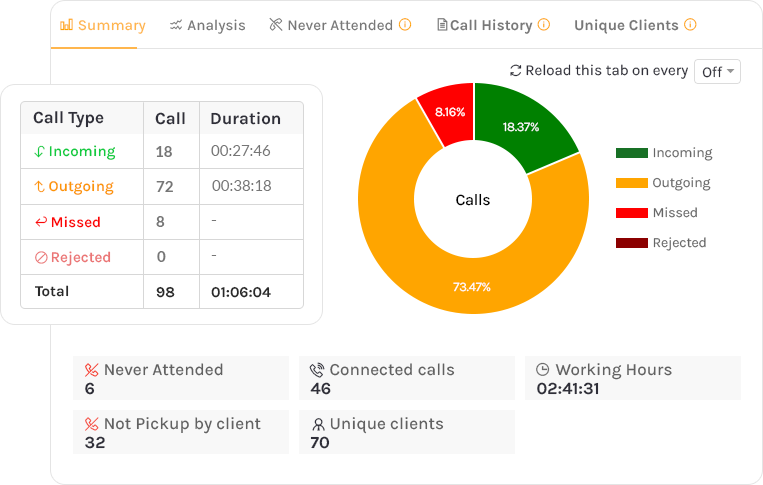
- Track live call activities, ensuring you know what’s happening in your sales funnel.
- Monitor metrics like call duration, call frequency, and the number of calls made, which will help you assess team productivity instantly.
2. Comprehensive Reporting and Analytics
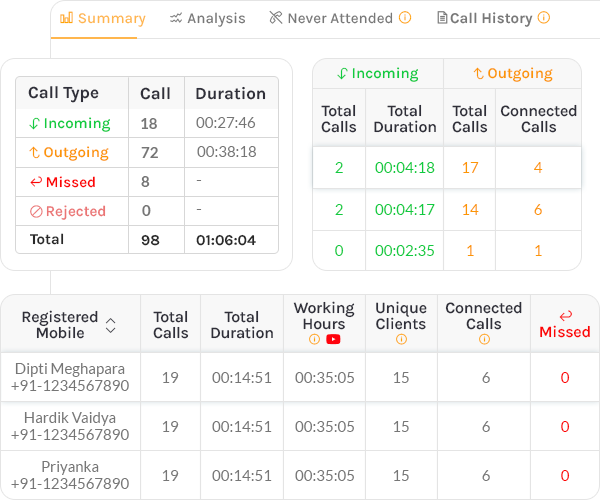
- Generate detailed reports on individual and team performance.
- Analyze call data to identify patterns, such as peak times for customer engagement or the most effective follow-up strategies.
- Create custom reports to track KPIs like lead conversion rates or sales cycle efficiency.
3. Smooth Remote Team Management
Whether your sales team is in the office, working remotely, or spread across multiple locations, Callyzer ensures you’re always connected:
- Track remote employee activity with ease.
- View call summaries for individual team members to assess their performance, no matter where they are.
- Get insights into how your team uses their time to optimize resource allocation.
4. Call Recording and Synchronization
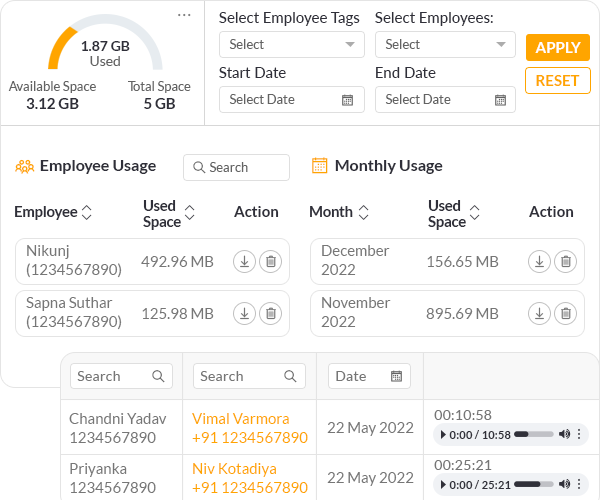
- Automatically sync and store call recordings for easy reference.
- Use recordings to train new team members or review specific interactions to improve customer communication.
5. Lead Management and Reporting
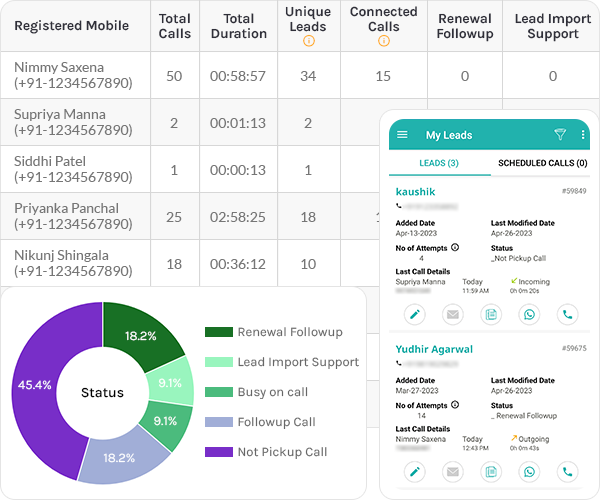
- Organize and prioritize leads based on their potential value.
- Track lead status through each sales funnel stage, ensuring no opportunity is overlooked.
- Generate reports to measure lead conversion rates and refine your strategies.
Looking for an easy way to monitor your sales team's calls and performance?
Callyzer's Sales Monitoring Software provides real-time dashboards, call tracking, activity reports, and team analytics to help managers improve productivity.
6. Employee Performance Evaluation
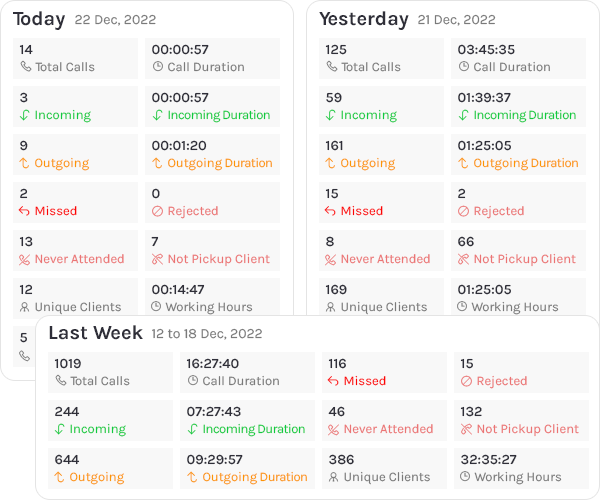
- Measure individual team members against benchmarks like call volumes, talk times, and closure rates.
- Identify top performers and areas where coaching might be needed.
- Use performance insights to set realistic goals and motivate your team.
7. Benchmark Setting and Productivity Optimization
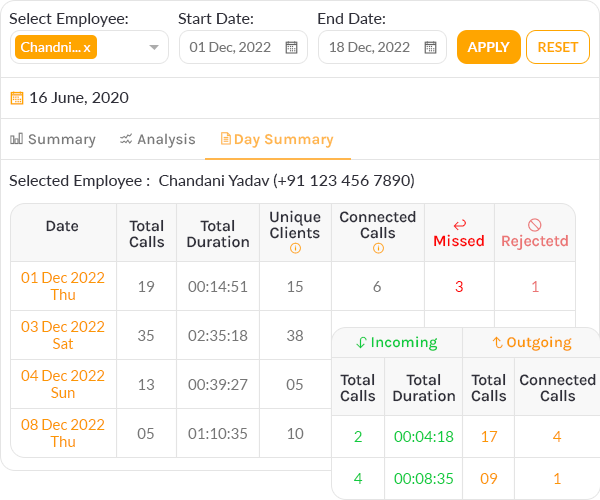
- Set performance benchmarks for your sales team to ensure everyone is aligned with organizational goals.
- Identify time spent on productive calls versus unproductive activities, helping you maximize your team’s efficiency.
8. Integration With Sales Processes
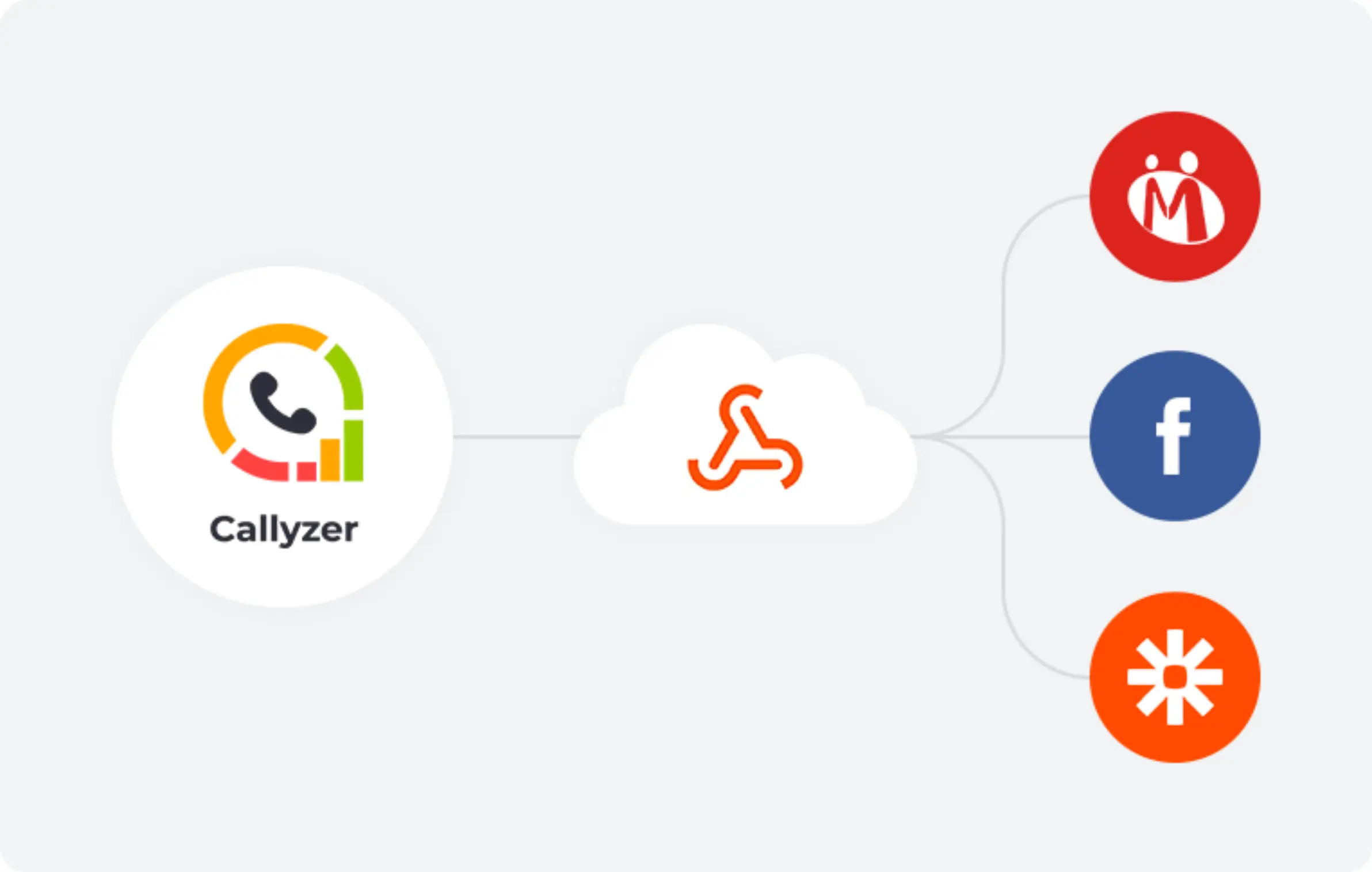
- Easily integrate Callyzer with your existing tools and CRM systems for a seamless workflow.
- Sync customer data and call logs across platforms to streamline operations.
The Future of Sales Monitoring
Sales monitoring is only going to get smarter. Here’s what’s on the horizon:
- AI-Driven Recommendations: Tools that not only analyze data but suggest actionable steps.
- Enhanced Predictive Analytics: Imagine knowing which leads will convert before you even reach out.
- Gamification: Turn sales tracking into a game with leaderboards, rewards, and friendly competition.
Time to Take Action
Setting up a sales monitoring system might sound like a big task, but trust me, it’s a game-changer for your sales performance. Start with the 6 steps above, choose tools that fit how your team sells (for calling teams, that means call monitoring that works on regular SIM calls), and involve your team.
Over time, you’ll not only see better results throughout the sales cycle, but you’ll also feel more in control of your sales process.
Ready to take your sales strategy to the next level? Implement these tips, try out Callyzer, and watch your sales soar. You’ve got this!
FAQs About Sales Monitoring Systems
What is a sales monitoring system?
A sales monitoring system is a set of metrics, review routines and tools that a business uses to track sales activity, pipeline movement and results as they happen, so managers can identify problems early and act on them. For a small team, this may simply be a shared spreadsheet reviewed every week. Larger teams usually rely on software that log calls, emails and meetings automatically.
What is the difference between sales monitoring and sales tracking?
Sales tracking is about recording what your team does: calls made, meetings held, deals closed.
Sales monitoring is about what you do with that record. This is about analyzing the data on a regular basis relative to your objectives and taking action when you begin to see results slipping.
How can I effectively monitor sales?
Begin with a single objective along with three to five metrics which lead to the accomplishment of that objective. For instance, meetings scheduled, following ups done, and deals made. But before you define objectives and metrics, gather information for two weeks to know how well does your team performs normally. After that, track the same metrics on every fixed day of the week if the performance of your team deviates from the normal standards take action on those metrics.
Which KPIs should I use to monitor sales performance?
We suggest you focus on those KPIs that can measure all the processes involved in the sales cycle and not just the activity. As a starting point, there should be five: activity completion rate, transition rate between stages of the pipeline, lead response rate, revenue generated vs. target, and customer retention. When your sales people become familiar with these metrics, you can add more.
How often should sales performance be reviewed?
Review activity metrics daily, pipeline metrics weekly and revenue monthly. Customer metrics such as retention and lifetime value move more slowly, so a quarterly review is usually enough. Keep the daily review to around ten minutes. A short review is far more likely to happen every day than a long one.
What are the benefits of sales monitoring?
The biggest advantage is time. If a salesperson’s response rate drops in the second week of the month, regular monitoring brings it to your attention within days, while there is still time to offer support. Monitoring also makes forecasts more reliable, because they are based on the current pipeline rather than estimates, and it gives managers clear, factual information to bring into coaching conversations.
How do I monitor my sales team without micromanaging?
Start with transparency. Tell your team which metrics you track and how the data will be used, and give each salesperson access to their own dashboard. Focus on weekly trends rather than individual hours, and keep conversations about performance private. Most resistance to monitoring comes from uncertainty about how the data will be used, so clear communication at the start prevents most of it.
How do I monitor my sales team’s calls?
The most reliable method is call monitoring software that captures call data directly from each salesperson’s phone: total calls, connected calls, call duration and, where consent has been given, recordings. This removes the need for manual call logs, which are often incomplete. Numbers alone will not show how a conversation went, so we also suggest listening to a small sample of each person’s calls every week.
Can I monitor a remote or work-from-home sales team?
Yes. When calls, emails and meetings are captured automatically, you can monitor a remote team as accurately as one in the office. The real difference lies in communication. Employees working from home have less visibility into how their data is used, so a written monitoring policy, shared dashboards and regular one-on-one meetings become even more important.
Does sales monitoring software work without cloud telephony?
Yes, depending on the tool. Some systems rely on cloud telephony, which routes calls over the internet and usually requires new virtual numbers. SIM-based tools, such as Callyzer, capture call data directly from each salesperson’s Android phone, so your team continues to use its existing mobile numbers. Confirm which approach a tool uses before you commit, as it affects both setup time and cost.
Can I monitor sales using Excel or Google Sheets?
Yes, for a small team. With two or three salespeople, a shared spreadsheet containing a daily activity log and a weekly pipeline summary is usually sufficient. As the team grows, manual entry becomes harder to rely on. Entries are missed or estimated, and problems tend to surface only after the reporting period has closed. That is generally the point at which automated software becomes worth the investment.
How can I choose the right sales monitoring tools?
Begin with how your team actually sells. If most of the work happens on the phone, automatic call logging is essential; if your team relies on email and meetings, look for inbox and calendar integration instead. Beyond that, assess CRM compatibility, the pricing model (per user or per device), and how the vendor stores and protects your data. The six-point checklist in this guide sets out these criteria in more detail.
Is it legal to record and monitor sales calls in India?
In most cases, yes, provided it is done transparently. Inform customers that calls may be recorded and obtain their consent, set out your employee monitoring practices in a written policy, and store recordings securely for no longer than necessary. These steps are in line with the Digital Personal Data Protection Act, 2023. Because every business is different, we recommend seeking legal advice for your specific situation.