
Most sales teams don't lose deals from a shortage of leads. They lose deals because no one tracks what happens to the leads they already have. CRM lead management fixes that by putting capture, scoring, routing, and follow-up in one system instead of scattered spreadsheets and memory. This guide compares seven leading CRM lead management systems and lays out the criteria to check before choosing one for your sales team.
Most sales leaders treat low conversion as a lead volume problem. They assume the fix is more leads or a bigger ad budget.
In practice, the real issue usually is duplicate calls from unassigned data, high-intent leads sitting unrouted for hours, or reps who stop following up after one unanswered call because nothing reminds them to try again.
None of this is a lead-generation problem. It's a process problem, and process problems are much easier to fix than lead volume ever is.
The problems arise in pretty much every sales force, without exception. The leads are generated from advertisements, recommendations, walk-in customers, and cold calls, and each of these sources maintains their own data. Representatives keep track of whom they called and whom they didn’t based on memory, a notebook, or an Excel file, and no one else is aware of the status of these leads without asking.
Marketing blames sales for slow follow-ups. Sales blames marketing for weak leads. And the manager is left guessing what is actually going wrong because there is no reliable data to learn from.
CRM lead management is the discipline built to close that gap. It replaces scattered channels and personal memory with one system that every rep and manager can see, so leads get worked instead of just collected.
Get it right, and a messy list of enquiries turns into a pipeline a manager can review at a glance. Without a proper lead management process, and adding more leads won't fix the conversion rate.
What Is Lead Management in a CRM?
Lead management is all about ensuring that not a single lead gets lost throughout the sales funnel. From the time a lead enters your organization till they either get converted to a customer or fail to convert, every step of the way counts in lead management. New to CRM? Read what is CRM software first.
Effective CRM Leads Management System consolidates all this process in one easy package. It makes it possible for a team to gather leads from various sources, prioritize them, assign to reps, and track the progress.
A typical CRM lead management solution does the following:
- Capture: Capture leads from ads, landing pages, WhatsApp, walks, and calls.
- Scoring: Prioritize leads based on their propensity to buy.
- Assignment: Route leads to appropriate reps, promptly.
- Tracking: Capture every interaction made with the lead in terms of calls and messages.
- Reporting: Ensure managers know what is going on with their team in order to evaluate its performance.
Skip any one of these, and the system breaks down somewhere.
For instance, skip scoring, and reps waste time on cold leads. Skip tracking, and nobody can prove why a deal was lost. This is exactly the gap telecalling CRM software is built to close, by keeping capture, scoring, and tracking tied to the same record instead of scattered across tools.
Why Indian Sales Teams Struggle With Lead Management
Most sales teams aren't short on leads. They're short on a system to work those leads properly.
Common failure points:
- Duplicate leads. The same inquiry comes in through a Facebook ad, a website form, and a walk-in, and three reps end up reaching out to the same person on the same day.
- Slow first response. Leads contacted within minutes convert at a far higher rate than leads contacted hours later. Manual assignment routinely takes hours.
- No visibility into sales activity. Managers can't see how many calls, emails, or follow-ups a rep has actually made. This makes it hard to tell whether a stalled deal is a lead-quality problem or an activity problem.
- Follow-ups die after one attempt. Most buyers need several touchpoints before saying yes. Reps naturally stop chasing after one or two.
- Data spread across tools. Leads are maintained in a spreadsheet, conversations take place through phone calls, emails, and WhatsApp, but not in one single system that anybody can look into and review.
A CRM system that does everything right to manage leads takes care of all of these (capturing, scoring, assigning, tracking activities, and scheduling follow-ups), all in an automated manner and visible, instead of dependent on one person's memory.
This matters even more for lead sourcing for a cold-calling team, where a single missed callback can be the difference between a conversion and a cold trail.
What a Strong CRM Lead Management Setup Looks Like
Not every CRM lead management software solves the same problem. Before choosing one, check it covers these basics.
Best CRM for Lead Management: Must-Have Features
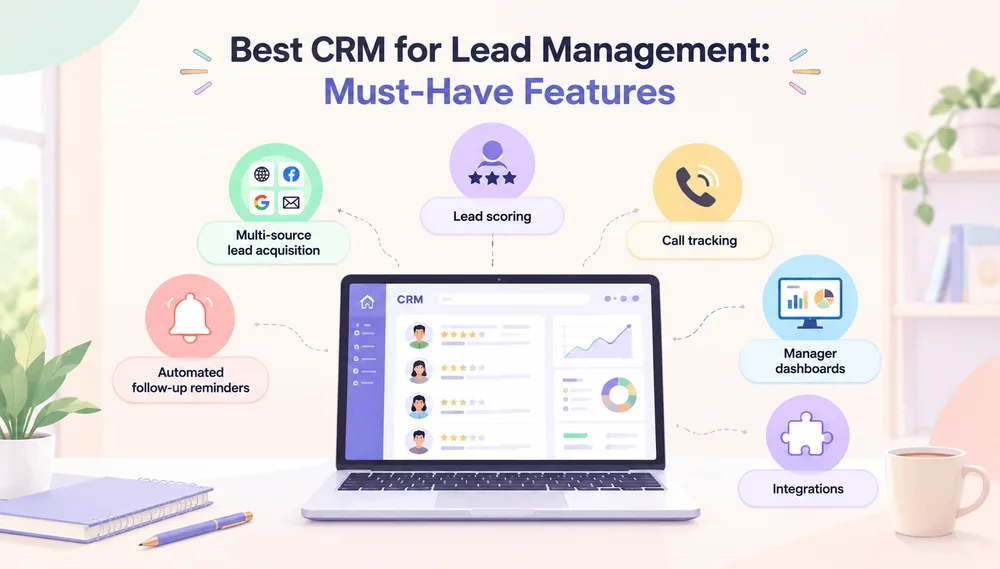
- Automated follow-up reminders: nudges reps before a lead goes cold between touchpoints, one of the simplest lead nurturing strategies available
- Multi-source lead acquisition: all should end up in one place, instead of five inboxes
- Lead scoring: helps sales rank leads based on intent and engagement, which means top reps spend time on the right people
- Call tracking: tracks who called who, duration of the call, and what the call was about, rather than someone filling a note field based on memory which is not accurate data.
- Manager dashboards: real-time view of calls made, leads pending, and conversion rate, no end-of-day status calls required
- Integrations: native or Zapier-based connections to tools you already use, like Zoho, Bitrix, LeadSquared, and WhatsApp
5 Best CRM Lead Management Software Options
Here are five Lead Management Software worth evaluating, with the specific lead management features each one offers.
1. Callyzer: Best for Indian Sales Teams
Callyzer is built for Indian sales teams, who usually prefer SIM-based calling over VoIP or internet-dependent systems. It works directly on a rep's existing Android device and SIM card, with no separate calling setup and no dependency on strong internet.
Lead management features:
- Multi-source lead capture: automatically pulls in leads from Facebook, Instagram, landing pages, IndiaMART, and Google Sheets, then distributes them to the right rep instantly, so no enquiry sits unassigned
- SIM-based call capture: every call a rep makes or receives is logged automatically against the lead record, with no manual data entry
- Call tagging and notes: reps can tag each call by outcome and add a note after the conversation, so the next follow-up starts with full context instead of a rep asking the customer to repeat themselves
- Follow-up reminders: flags leads with a pending or missed follow-up and surfaces the last-contacted date, so a callback doesn't depend on a rep remembering to make it
- Real-time call dashboard: managers see live call volume, connect rate, and idle time per rep, across the whole team
- Idle-time alerts: flags when a rep isn't dialling, so slow follow-up gets caught the same day, not at month-end
- Automated call and lead reports: daily and weekly summaries, plus lead-status reports, land in a manager's inbox automatically, replacing manual status updates
- CRM and marketing integrations: connects with Zoho, Bitrix, LeadSquared, WhatsApp, and Zapier through its API, so it layers onto systems you already run
- Works offline-first: call logging holds up on ordinary mobile carrier networks, which matters for teams operating outside major metros
2. HubSpot CRM
HubSpot is one of the most widely adopted CRMs globally.
Lead management features:
- Contact and deal tracking on a free-forever plan
- Email tracking with open and click notifications
- A meeting scheduler tied directly to the lead record
- Lead scoring on paid tiers
- Marketing automation that hands qualified leads to sales reps automatically
3. Zoho CRM
Zoho is a CRM built for teams that want to shape the system around their own process rather than adapt to a fixed one.
Lead management features:
- Lead scoring based on demographics and behaviour
- Omnichannel lead capture across email, social media, and web forms
- Custom workflow automation for routing and follow-up rules
- A wide third-party integration marketplace
- Built-in analytics and reporting
4. Salesforce: Best for Enterprise-Scale Automation
Salesforce is one of the most established CRMs on the market, built for large organisations that need deep customisation and automation at scale.
Lead management features:
- Advanced lead tracking across long, multi-stage sales cycles
- Automation builders for high-volume lead routing and nurturing
- Fully custom dashboards per team or region
- Extensive reporting depth for enterprise sales operations
- A large ecosystem of add-ons and integrations
5. LeadSquared: Best for High-Volume Enterprise Teams
LeadSquared is built for organisations processing large daily lead volumes.
Lead management features:
- Advanced lead scoring and nurturing workflows
- Marketing automation tied directly to sales follow-up
- A mobile CRM for field and inside-sales reps
- Multi-channel communication tracking
- Strong automation for lead distribution at volume
Turn Better Lead Management Into More Conversions
Looking for a simple way to track leads, manage follow-ups, and improve your sales team’s productivity? Callyzer helps businesses manage leads and calls from one centralized platform.
How to Choose the Right CRM Lead Management System
Most CRMs look similar on paper. The real differences only show up once you test how each one behaves in daily use. Work through these before you commit to one.
- Match it to how your team sells.
Every sales team works differently, and the CRM should fit that, not the other way around. If your reps close deals over the phone, call logging needs to be a core part of the product, not an add-on. Add-on call tracking tends to break down once call volume goes up. If your team relies more on email, chat, or in-person visits, look for the same thing in those areas: is tracking built in, or bolted on? Buy for how your team actually sells, not for a generic sales process. - Check whether leadership can see performance without asking for it.
If someone has to prepare a status report, the dashboard isn't doing its job. Look for real-time data on call volume, connect rate, and pending follow-ups. That way, a manager can spot a stalling lead today, not next week. - Look past "has an API" to real integration depth.
Check if it actually connects to your lead sources, such as Facebook Ads, Google Ads, and IndiaMART, along with your CRM (Zoho, Bitrix, LeadSquared) and WhatsApp. Most Indian sales teams live in these tools all day. If you still need to export and import data by hand, the tool hasn't solved your problem. - Compare pricing against how your team grows.
Pricing models vary a lot: per-seat, per-phone, flat-fee, or usage-based, and each behaves differently as your team changes size. Per-seat pricing can get expensive fast if you hire often or scale up during busy seasons, while flat-fee or usage-based models tend to move more predictably with growth. Also check what's locked behind higher plans, since lead scoring, call recording, and reporting are often paid extras, so the sticker price rarely reflects what you'll actually end up paying. - Weigh the rollout effort, not just the feature list.
A CRM solution that needs six weeks and a full-time administrator to implement is out of the question for a small team. Ask about who does the implementation work—yourself or the vendor—and how fast a new rep gets going. CRM deployments tend to fail due to slow adoption, not lack of features. - Confirm it meets your data security and compliance needs.
For Indian businesses, this mostly means checking how the system stores customer data and call recordings under the DPDP Act, including consent and where the data lives. - Run the trial on a real scenario, not a demo.
A free trial only tells you something if you run real leads through it. Hand it to a few reps, watch how fast they use it on their own, and check whether the reports actually answer the questions your managers ask every week.
Real estate teams, banking DSAs, and insurance sales desks each have slightly different needs here. Call tracking software for real estate, for instance, has to tie every call back to a specific project or unit, which not every general CRM does out of the box.
Final Thoughts
There's no single best CRM for lead management that works for every business. The right pick depends on how your team actually manages leads today, and where that process is breaking down.
What matters most isn't the brand name. It's whether the system covers the full job: capturing every lead, scoring it, getting it to the right rep fast, and following up until it converts or drops off. A CRM that only stores contact details isn't managing leads. It's just holding them.
If missed follow-ups and invisible activity are costing you conversions, start by checking what a structured lead management system actually does once a team scales past a handful of reps. That's usually where the gap becomes expensive.
Frequently Asked Questions
What is lead management in CRM?
Lead management in a CRM is the method by which you collect details of prospective customers, record every contact and conversation you have with them, and nurture them until they become customers or fall off. It makes obsolete the use of spreadsheets and memory-based follow-ups.
Is Callyzer an affordable lead management software for sales teams?
Yes. Callyzer is priced per phone rather than per user, starting around ₹175 per phone per month, which keeps costs predictable as a telecalling team grows. A 15-day free trial covering five numbers is available to test it first.
Can small businesses use Callyzer for lead and sales call management?
Yes. Callyzer works on a rep's existing Android phone and SIM, so small teams can start tracking calls and leads without new hardware or VoIP setup. It's used by teams as small as a handful of telecallers and by large enterprise sales teams alike.
How do I choose Callyzer as the right lead management software for my business?
Callyzer fits best if your team sells primarily over the phone and needs reliable call tracking on ordinary mobile networks. If your priority is visibility into calls made, missed, and converted, along with integrations with Zoho and LeadSquared, it's worth trialling against your current setup.
What features should I look for in the best CRM software for lead management?
Consider options that include multiple sources lead capture, lead scoring, automated reminders for following up, real-time call tracking, management reporting, and compatibility with applications that your team uses. Otherwise, a CRM solution would be an extra place where you need to input information.