
What is CRM software? It's a tool that keeps all your leads and customers in one place. For every customer, it saves their contact details, call logs, message and meeting, and what your team needs to do next. Without a CRM, leads usually sit in diaries or spreadsheets, and follow-ups get missed. Read on to find out who uses a CRM, what features it has, the main types and benefits. We also explain how a CRM differs from Excel, ERP and CDP, and how to pick the right one for your team.
Every business depends upon relationships with its customers. A CRM is an effective way to manage those relationships as the business expands.
What Is CRM Software?
CRM stands for Customer Relationship Management.
Customer Relationship Management is a business strategy that keeps track of everyone you sell to, both prospects who haven't bought yet and customers who already have, so no one gets forgotten and every conversation picks up where the last one ended.
CRM software is the tool that puts that strategy into practice. It stores each person's contact details, a record of every call, email sent, meeting details, and what needs to happen next.
Your whole team works from the same information, so anyone can open a contact and see the full history before making a contact with the client.
In short, CRM meaning is the way a business manages its relationships with prospects and customers, and CRM software is where all of that information lives.
Why Do Businesses Use CRM Software?
To understand why, let's follow one lead through a business that doesn't use a CRM.
What happens to a lead without a CRM?
- A new lead comes in from a Google ad. The salesperson writes the name and number in a diary or an Excel sheet.
- The salesperson calls. The conversation goes well, and the prospect asks for a call back in two days.
- The salesperson writes "call back Thursday" in the diary. There's no note of what the prospect needed, what price was discussed, or what doubts they raised.
- Thursday gets busy. The diary entry is buried under a dozen newer leads, and the follow-up is missed.
- When the salesperson finally calls back, the prospect has already bought from a competitor who followed up on time.
The lead is lost, even though nobody made an obvious mistake.
That is just one lead. Now repeat it across every salesperson, every week. Add duplicate calls, forgotten follow-ups, and customer history that disappears when a salesperson leaves. These are the everyday problems of selling without a CRM.
How a CRM fixes the problem
Now picture the same lead in a business that uses a CRM.
The lead comes in from the Google ad and goes straight into the CRM, where it's assigned to a salesperson within seconds. The call is logged automatically.
After the call, the salesperson adds a note about what the prospect needs, the price discussed and their doubts, and sets a follow-up for Thursday.
On Thursday morning, the CRM sends a reminder. The salesperson calls back on time, already knowing the full context, and the prospect is still interested.
If the follow-up had been missed, the manager would have seen it marked as overdue.
That's what CRM software is really for. It manages the full customer lifecycle in one system, so every lead goes through the same process:
Lead is captured → Lead is assigned → Team makes contact → Follow-up is scheduled → Deal moves through stages → Deal is won or lost → Relationship continues
Who Can Use a CRM?
Sales is the most common use, but the answer to what is CRM software changes slightly depending on who is using it.
Sales teams
The sales team will leverage a CRM for accessing and managing the assigned leads, contacting them through all channels, scheduling follow-ups, and closing deals.
It doesn’t matter whether the salesperson contacts a lead via phone calls, text messages, or WhatsApp chats; every single one of them will be logged in the same lead record automatically.
In the case of phone calls, a CRM will document who was called, if the phone was answered, and for how long they have talked.
In the case of SMS/WhatsApp, it records all sent and received messages.
It's no surprise that 70% of sales reps believe using a CRM helps them close more deals, according to CRM statistics compiled by Pipeline.
Marketing teams
Marketers use CRM data to track which campaigns and channels produce real customers, not just enquiries. This helps them spend their budget on the sources that actually convert.
Customer support teams
All the activities that take place while interacting with the customer are documented in the customer’s records, whether it is through calls, SMS, WhatsApp, emails, and notes. Also, call recordings are linked to those calls.
While replying to the customer’s query, the support agent can refer to this complete history or can just listen to the last call made by the customer to know the exact problem they were facing.
Business owners and sales managers
Owners and managers get a complete view of what their team is doing, without chasing anyone for updates.
Every interaction across calls, SMS, WhatsApp, email, and meetings sits on one timeline. They can see who contacted which lead, on which channel, what was discussed, and which leads haven't been touched yet.
The analytics turn this activity into business decisions across the whole company:
- Sales insights: pipeline value, win rate, deal stages where leads get stuck, and expected revenue for the month
- Team insights: activity and conversions per salesperson, lead response time, and overdue follow-ups
- Marketing insights: which campaigns and lead sources, such as Google Ads, Facebook, the website, or referrals, bring in paying customers, the cost per lead, and the conversion rate for each channel
- Channel insights: which channels customers respond to most, whether calls, WhatsApp, SMS, or email
- Customer insights: repeat purchases, renewals, and customers who have gone quiet and need attention
With these numbers, owners can move budget to the channels that bring real customers and see where revenue is coming from.
Managers can spot top performers, find who needs coaching, and set targets based on real data instead of guesswork.
What Are the Main Features of CRM Software?
Every CRM is different, but most include the features below.
Lead capture
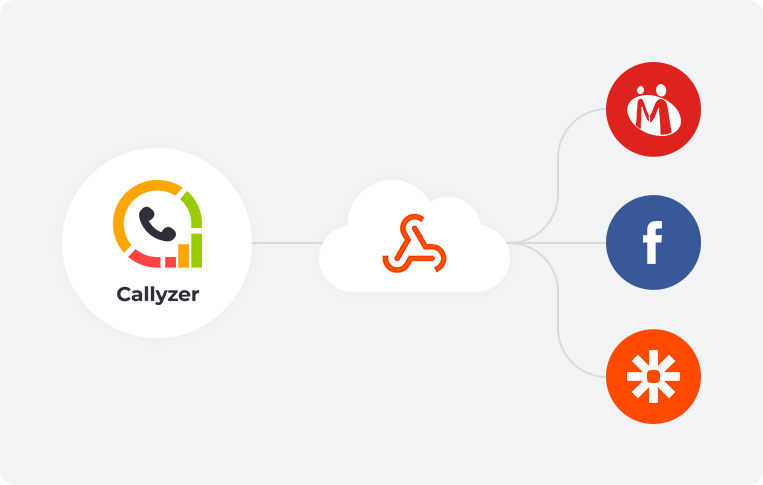
The CRM automatically gathers leads from all the channels that you use: your website form submissions, Facebook or Google Ads, online marketplaces, landing pages, or imports from Excel or CSV files. Most CRMs are also able to gather leads via API or webhooks.
As each lead arrives, field mapping places the data in the right fields (name in the name field, phone number in the phone field) and the CRM creates a lead record.
Duplicate checks compare the phone number or email with existing records, so the same person isn't added twice.
Lead assignment and distribution
Assignment rules decide which salesperson gets each lead. Common rules include:
- Round-robin: leads are shared evenly across the team, one after another
- Rule-based: leads are routed by territory, product, language, or lead source
- Weighted: senior or better-performing salespeople receive a larger share
The lead reaches its owner within seconds, with no manual sorting. If the owner doesn't act on a lead within a set time, some CRMs reassign it automatically so it doesn't go cold.
Contact and lead records
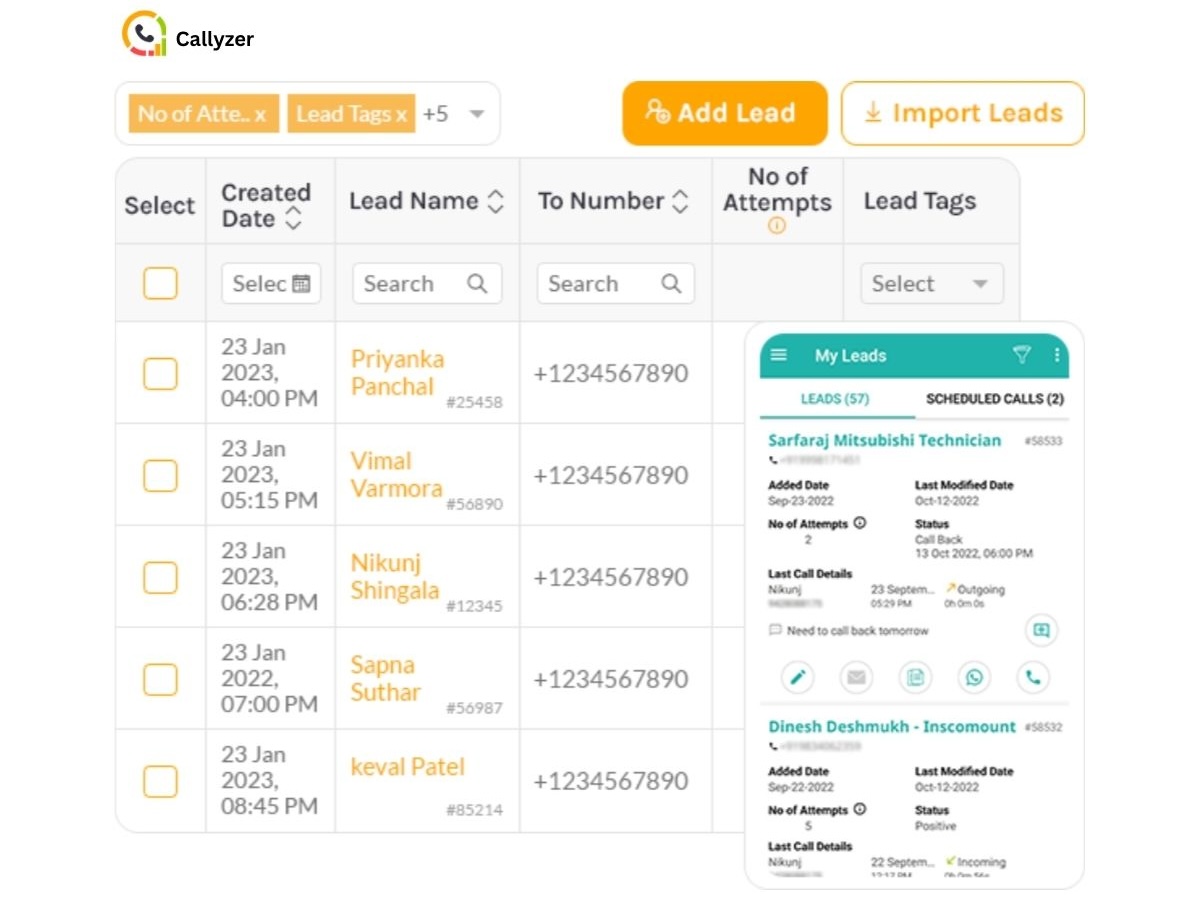
A lead record is like a digital profile card for each customer. Everything about that person is saved on one page:
- Contact details: name, phone number, email, company, and city
- Lead source: where the lead came from, such as a Google ad or your website
- Lead status: where the lead stands right now, such as New, Interested, or Not Reachable
- Lead owner: the salesperson handling the lead
You can also add your own fields for anything your business needs to know, such as the customer's budget or the product they want.
To keep things organized, you can add tags. Tags are simple labels like "Hot lead" or "Renewal due." Filter by a tag, and you see every matching lead in one list.
To learn more, read our guide on CRM lead management.
Activity tracking
All interactions made with the lead are recorded on their activity timeline in the chronological order in which they have occurred.
Phone calls, text messages, WhatsApp messages, emails, appointments, notes, and status change are kept in a single place so that the whole story can be read top to bottom.
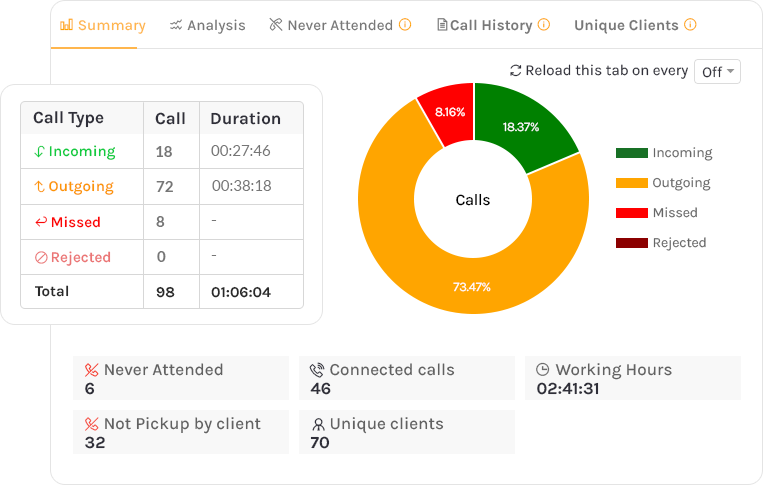
Calls are logged automatically with the call type (incoming, outgoing, missed, or rejected), date, time, and duration. If call recording is set up, each recording is attached to its matching call.
When a lead changes hands, the new salesperson opens the record and sees exactly what has happened so far. There's no need to ask the previous owner or restart the conversation from scratch.
Pipeline management
A pipeline breaks your sales process into stages, such as New, Contacted, Qualified, Proposal Sent, Negotiation, and Won or Lost. Each deal sits in one stage and moves forward as the prospect gets closer to buying.
Managers can see how many deals sit in each stage, their total value, and how long they've been there.
When a deal is lost, the salesperson records why, whether it was price, timing, or a competitor. Over time, these lost reasons reveal patterns.
For example, If most deals are lost on price, the team knows exactly what to fix.
Follow-up and task management
After every conversation, the salesperson sets the next step as a task with a due date: a callback, a quotation to send, or a demo to schedule.
The CRM sends a reminder when the task is due. If the task isn't completed on time, it's marked as overdue and becomes visible to both the salesperson and the manager.
Lead and customer nurturing
Not all leads are immediately ready for a sale during their first interaction. Lead nurturing helps to retain them through a set of follow-up actions, including a phone call in two weeks, product update on WhatsApp, and email promotion offers.
This process is often implemented in CRMs in the form of drip campaigns – sending out the series of pre-set messages automatically until the lead replies or decides to make a purchase.
Customer nurturing continues post-purchase, with its goal being customer retention, or keeping the current customers satisfied enough to make further purchases.
CRM collects purchases, orders, and service requests into one record, and sends reminders regarding renewals, repeat orders, and check-in calls.
Before pitching an upgrade, a sales representative sees what the customer purchased previously, while the support agent sees previous complaints in order to respond accordingly.
Workflow automation
Automation runs repetitive work on trigger-and-action rules.
Trigger refers to the event that happens such as the arrival of a new lead or change in deal stage.
Action refers to the reaction of the CRM such as assigning the lead, welcoming the customer, making follow up activity or notifying the manager.
One trigger can have multiple actions at once without doing any manual work.
Reporting and analytics
Real-time dashboards turn activity into numbers the team can act on. Common metrics include:
- Lead response time
- Conversion rate by lead source
- Pipeline value by stage
- Win rate
- Calls made, connected calls, and talk time per salesperson
Filters let managers compare performance by team, person, date range, or campaign.
For calling teams, these reports show where productivity is being lost. You can learn more in our guide to call center analytics for telecalling.
User roles and permissions
Role based access controls who views and modifies what. The admin views the entire account, the team lead views their own team’s information, and the sales person views their own leads.
It maintains customer data security and prevents any accidental modifications.
Integrations and data sync
The CRM is integrated with other tools that you use in your team, including email, calendar, calling applications, WhatsApp, marketing software, and accounting software.
This is accomplished using native integration, APIs, and automation tools like Zapier. The two-way synchronization helps to ensure consistency of data across all tools, and any update is reflected in all other tools.
Mobile access
Field sales, real estate, insurance, and telemarketing staffs spend the whole day working on their mobile phone. Mobile CRM will help them to view leads, call logs, and update records in real-time.
For distributed teams, keeping mobile data in sync with the central dashboard matters just as much.
By using CRM synchronization for remote sales, all contacts made by the sales person through their mobile phone will reflect in the central dashboard immediately, regardless of whether the sales team is in their office or out in the field.
What Are the Types of CRM?
CRMs are commonly grouped in two ways: by their main purpose, and by the kind of work they are built for.
Types of CRM by purpose
- Operational CRM
- What it does: Automates the routine activities related to sales, marketing, and service.
- Features: Sales automation (lead management, lead assignment, pipeline management, and follow up), marketing automation (campaign, drip messaging, and lead scoring), service automation (ticketing and case management), and contact management.
- Good for: Those who wish to do less manual work and respond quickly.
- Example: A lead inquiry is automatically assigned to a salesperson, a follow up task is created, and a welcome message is sent through WhatsApp.
- What it does: Automates the routine activities related to sales, marketing, and service.
- Analytical CRM
- What it does: Studies customer and sales data to find patterns and guide decisions.
- Key features: A central data store, data mining, reports and dashboards, customer segmentation, sales forecasting, and lead source attribution.
- Best for: Owners, managers, and marketers who make decisions from data.
- Example: A report shows that referral leads convert better than ad leads, so the business shifts its budget.
- Collaborative CRM
- What it does: Shares customer information across departments, and sometimes with partners and distributors.
- Key features: Interaction management, which keeps every touchpoint in one history, and channel management, which covers phone, SMS, WhatsApp, email, social media, and in-person contact.
- Best for: Businesses where several teams or outside partners serve the same customer.
- Example: A support agent sees that the salesperson promised a free installation and honours it without asking the customer to repeat themselves.
- Strategic CRM
- What it does: Builds long-term relationships, loyalty, and customer lifetime value.
- Key features: Segmentation by customer value, retention and loyalty tracking, renewal reminders, and feedback tracking.
- Best for: Businesses with repeat purchases, subscriptions, or renewals.
- Example: The CRM flags customers who haven't ordered in 90 days, and the team sends them a personalized offer.
Types of CRM by use case
- General-purpose CRM
- What it does: Covers sales, marketing, and service for many kinds of businesses in one platform.
- Key features: Contact management, sales pipelines, email integration, marketing tools, a service desk, and reports.
- Best for: Businesses with varied processes that are willing to customize the setup.
- Example: A B2B company tracks deals, runs email campaigns, and handles support tickets from one system.
- What it does: Covers sales, marketing, and service for many kinds of businesses in one platform.
- Telecalling CRM
- What it does: Manages leads and calls for teams that sell mainly over the phone.
- Key features: Automatic call logging, call history, call recordings, missed-call tracking, lead assignment, follow-up reminders, and calling reports.
- Best for: Inside sales, telemarketing, loan and insurance sales, admissions counselling, and real estate pre-sales.
- Example: Every call a salesperson makes is logged against the right lead, and the manager sees connected, missed, and unanswered calls in real time.
- What it does: Manages leads and calls for teams that sell mainly over the phone.
- WhatsApp CRM
- What it does: Manages sales and support conversations on WhatsApp.
- Key features: A shared team inbox, chat history on the customer record, message templates, broadcasts, and automated replies.
- Best for: Businesses where customers prefer messaging to calls or email.
- Example: A customer asks for a price on WhatsApp, and any team member can open the chat and reply with a quote.
- What it does: Manages sales and support conversations on WhatsApp.
- Industry-specific CRM
- What it does: Fits the workflows of one sector out of the box.
- Key features: Ready-made fields, pipeline stages, and reports for that industry, such as site visits for real estate or admission stages for education.
- Best for: Real estate, education, healthcare, lending, insurance, and similar sectors.
- Example: A real estate team tracks each buyer's budget, preferred location, and site visit dates without any custom setup.
- What it does: Fits the workflows of one sector out of the box.
Most modern CRMs combine several of these types in one platform, so choose based on the work your team does most.
Telecalling CRMs track calls in one of two ways.
Cloud telephony systems route calls over the internet using virtual numbers.
SIM-based systems track calls made from the salesperson's regular mobile phone and SIM card, so the team keeps its existing numbers. If phone calls are central to how you sell, it is worth comparing telecalling CRM software with a general CRM before you decide.
CRMs also differ in how they are delivered. Most are cloud-based and accessed through a browser or mobile app. Some large organizations still run CRM software on their own servers.
What Are the Benefits of Using a CRM?
A CRM changes the way your whole business works with customers. It isn't only a place for the sales team to store contacts. Here are the main benefits.
- No more lost leads: Every enquiry is captured and assigned automatically. Nothing sits unnoticed in an inbox, a notebook or someone's phone.
- Faster response to new leads: Your team can contact new leads within minutes of them enquiring. The business that reaches the customer first usually has the edge.
- Follow-ups that actually happen: Every callback a salesperson promises becomes a task with a reminder. If one is missed, it shows up as overdue for both the salesperson and the manager.
- Higher conversion rates: Quick contact, timely follow-ups and full context turn more leads into customers. Your pipeline data also shows which stage loses the most deals.
- Better, more personal conversations: Your team can see each customer's history before every call or message, so customers never have to repeat themselves.
- Stronger retention and repeat sales: Renewal reminders, repeat-order follow-ups and alerts for customers who have gone quiet help you keep the customers you already have.
- Less manual work: Automation takes care of data entry, lead assignment, follow-up tasks and reports. Your salespeople get to spend more of their time selling.
- Complete visibility for managers: Managers can see every call, message and follow-up across the team, and where deals are stuck, without chasing anyone for updates.
- Fair, data-based performance tracking: Every salesperson's activity and results are recorded. Reviews, coaching and targets are based on real numbers.
- Smarter marketing spend: Lead source tracking tells you which campaigns bring in paying customers. You can then move your budget to the channels that convert.
- More accurate sales forecasting: Since every deal is tracked by stage and value, managers can estimate upcoming revenue and plan ahead.
- Better teamwork across departments: Sales, marketing and support all work from the same customer record. The customer gets one consistent experience, whoever they deal with.
- Continuity when people leave: Customer history stays with the business. A new salesperson can pick up any lead exactly where it was left.
- Secure, organised customer data: All your customer data sits in one system with role-based access, instead of being spread across spreadsheets and personal phones.
- A process that scales: New team members follow the same process from day one. What works for five salespeople keeps working for fifty.
How Is CRM Different From Excel, ERP, and CDP?
CRM vs Excel
Most businesses start with a spreadsheet, and that works fine until more people join the team or lead volume grows to the point where managing everything by hand becomes difficult.
| Aspect | Excel or Google Sheets | CRM software |
|---|---|---|
| Lead capture | Leads are copied in by hand from ads, forms, and portals | Leads flow in automatically from every source |
| Lead assignment | A manager assigns leads manually, often late | Automatically assigns each lead to the right salesperson within seconds |
| Duplicate leads | Manual entry errors mean the same lead can be added twice | Duplicate checks flag existing records |
| Follow-ups | Depend on memory, diaries, or colour coding | A reminder is scheduled for every follow-up, and missed ones are flagged as overdue |
| Interaction history | Scattered across phones, inboxes, and notes, if saved at all | Every call, SMS, WhatsApp message, and email on one timeline |
| Call tracking | Calls are logged by hand, or not at all | Calls are logged automatically, with duration and recordings |
| Sales pipeline | Status is a column that someone has to update | A visual pipeline shows every deal by stage |
| Reports | Built manually with formulas and pivot tables | Real-time dashboards, ready whenever you need them |
| Automation | Very little, unless someone writes scripts or macros | Assignment, reminders, messages, and updates run on their own |
| Teamwork | Version conflicts and overwritten cells as the team grows | Built for many users working at the same time |
| Data security | Anyone with the file can copy, edit, or delete everything | Role-based access controls who sees and edits what |
| Mobile use | Hard to update properly on a phone | Mobile apps built for salespeople on the move |
| Scalability | Slows down and gets messy as rows and users grow | Handles more leads, users, and teams without rework |
| Cost | Free or already included in office software | A monthly subscription, usually priced per user or per device |
If more than one person works on your leads, or you can't say what happened to every inquiry last month, you have probably outgrown the spreadsheet.
CRM vs ERP
A CRM manages the customer-facing side of a business: leads, sales, interactions, and service. An ERP (Enterprise Resource Planning) system manages internal operations such as finance, inventory, purchasing, and supply chain.
The two often work together. The CRM handles the customer and the sale, and the ERP handles the invoice, stock, and delivery.
CRM vs CDP
A CDP (Customer Data Platform) collects customer data from many sources, such as websites, apps, and ad platforms, and combines it into unified profiles, mainly for marketing.
A CRM is where your team manages relationships and takes action: calling, following up, and closing deals. Many larger businesses use both, with the CDP feeding data into the CRM.
How Do You Choose the Right CRM?
Start with the problem you want to solve. It might be leads lost between channels, missed follow-ups, slow response times, scattered customer data, poor visibility into what your team is doing, weak marketing insights, or customers who don't come back.
Each problem calls for different features, so knowing yours first makes the choice much easier. Then work through these steps.
- Know your problem, then look for the feature that solves it. For example, if follow-ups keep getting missed, choose a CRM with scheduled reminders and overdue alerts.
- Cover every channel your customers use. If your team sells over calls, WhatsApp, SMS, and email, the CRM should capture all of them on the same record, not just one.
- Check the reports before you buy. Think about what you need to know as an owner every day: which lead source brings paying customers, how many leads your team contacted today, which deals are close to closing, and who on your team needs support. During the demo or free trial, make sure the dashboard shows you these answers in a few clicks.
- Set a realistic budget. Most CRMs charge per user per month, and some tools charge per device. If you are looking for an affordable CRM for small business needs, start with entry-level plans and free trials, and check what the price covers before you commit.
- Account for the full cost. Setup, data migration, training, and add-ons can add a lot to the subscription price. Many vendors offer CRM services such as implementation, onboarding, and training, so ask what is included and what costs extra.
- Check integrations. List the tools your team uses every day, such as ad platforms, email, and accounting software, and confirm the CRM connects with them.
- Think about the salesperson, not just the manager. If updating the CRM feels like extra work, your team won't do it. The more the system captures automatically, the better your data will be.
- Plan for growth. Make sure you can add users, fields, pipeline stages, and new lead sources without switching systems in a year.
- Test it with real users. Run the free trial on real leads, with the people who will use the CRM every day.
Getting Started With a CRM
Once you understand what is CRM software and what it can do for your team, the next step is simple: start small. Choose one clear goal, such as "every new lead gets a call within an hour." Set up only the pipeline stages your team already uses, and add automation once the basics are working.
A CRM works best when it fits the way your team already sells and removes work instead of adding it. Get that right, and the system becomes the place your team naturally goes to see what is happening with every customer.
FAQs
What is SIM-based CRM software?
SIM-based CRM software tracks calls made from a salesperson's regular mobile phone and SIM card, instead of routing them through internet calling or virtual numbers. An app on the phone logs every call automatically and links it to the right lead in the CRM. The team keeps its existing numbers, and customers see a familiar mobile number when they get a call.
How does CRM help telecalling teams?
Telecalling teams make a high volume of calls every day, and tracking them by hand doesn't work. A CRM assigns leads to each caller, logs every call automatically, reminds callers about follow-ups, and shows managers who called whom and what happened. Callers spend their time talking to customers instead of updating spreadsheets.
How can CRM software track sales calls?
A CRM tracks sales calls in one of three ways: through a built-in dialer, a cloud telephony integration, or a mobile app that reads the phone's call log. Each call is saved on the lead's record with the date, time, duration, and outcome. Depending on the setup, a call recording is saved too. Managers can then review call activity for each salesperson in reports.
Can a CRM track incoming and outgoing calls?
Yes. A CRM with call tracking logs both incoming and outgoing calls, along with missed, rejected, and unanswered ones. In many CRMs, an incoming call from a new number can be turned into a new lead, so phone enquiries are never lost.
Can CRM software manage leads and calls together?
Yes, and that's where a CRM is most useful. When calls are linked to lead records, every conversation sits alongside the lead's status, notes, and next follow-up. The salesperson sees the full history before calling back. The manager can see how many attempts each lead got before it converted or was dropped.
What should a sales team look for in a CRM?
Look for a CRM that fits how your team actually sells. It should:
- Capture leads from all your sources
- Track every channel you use, including calls, WhatsApp, SMS, and email
- Send follow-up reminders
- Give managers clear reports
- Be easy for salespeople to use on their phones
- Connect with your existing tools and fit your budget