- A sales employee tracking app helps businesses monitor daily activities, manage leads and measure employee performance.
- The right app depends on your sales model. Field teams need GPS and visit tracking, while phone-based teams need call analytics and lead management.
- Features such as activity reports, follow-up management, performance metrics and CRM integrations help improve accountability and sales productivity.
- Choose software that fits your team's workflow, is easy to use, protects employee data and provides actionable insights.
A sales employee tracking app helps businesses understand how their sales teams spend their working hours. It brings attendance, field visits, business calls, follow-ups and sales progress into one dashboard.
Without such a system, managers often depend on manual daily reports, phone calls and WhatsApp updates to understand team activity. This makes it difficult to get accurate information and identify problems on time.
For example, missed follow-ups, unrecorded client visits and delayed responses can affect sales long before they show up in monthly revenue figures.
A tracking app helps address these gaps by recording daily work activities and presenting them in clear reports. Managers can use this information to guide their teams, while employees get a reliable record of their work and achievements.
In this guide, we will look at how sales employee tracking apps work, the different types available and the features businesses should consider. We will also cover important performance metrics, employee privacy and the steps involved in choosing and implementing the right solution.
What Is a Sales Employee Tracking App?
A sales employee tracking app is a mobile or web-based platform that records the daily activities of sales employees and converts them into organised reports.
Employees can use the app to mark attendance, record client visits, update leads and track their progress. Managers can access this information through a dashboard and review team activities.
The main purpose is to give businesses a clear view of sales operations. Managers can make decisions based on actual work data rather than assumptions or delayed reports. Employees also get a transparent record of their activities and performance.
Other Names You May See
Different software providers use different names for similar solutions. Some common terms include:
- Salesman tracking app
- Field force tracking app
- Sales activity tracker
- Mobile CRM
- Sales team tracking app
Although these terms are often used interchangeably, the products may serve different purposes.
Some focus on employee location and field visits. Others monitor calls, manage leads or record sales activities. Understanding these differences is important when selecting an app for your team.
What Does a Tracking App Record?
The information collected depends on the app and the features enabled. Common data points include:
- Attendance: Check-in and check-out times, attendance records and working hours.
- Location: Client visits, routes travelled and time spent at different locations.
- Activities: Calls, meetings, tasks and completed follow-ups.
- Sales pipeline: Assigned leads, deal stages and expected deal values.
- Results: Orders, collections and progress against sales targets.
What Should a Tracking App Not Record?
A sales tracking app should focus on work-related activities, not an employee's private life.
Personal messages, private applications and location data outside working hours should remain outside the scope of employee monitoring.
Businesses should clearly communicate what information they collect and how they use it. We will discuss these privacy considerations in more detail later in this guide.
Who Uses Sales Employee Tracking Apps?
Different teams within an organisation can benefit from sales tracking software.
- Sales managers and team leaders: Monitor team activities, identify performance gaps and guide employees.
- Sales employees: Plan daily activities, record completed work and check progress against targets.
- Business owners and sales heads: Review team performance, monitor sales targets and understand revenue trends.
- HR and finance teams: Use attendance records and verified activity data for payroll inputs and expense checks.
What Are the Types of Tracking Apps for Sales Teams?
Not every sales team works in the same way. A field sales employee has different requirements from someone who handles enquiries and follows up with customers over the phone.
Sales tracking apps generally fall into six categories.
| Type | What it tracks | Best for | What to consider |
|---|---|---|---|
| GPS and field tracking | Live location, routes, visit time and geofenced check-ins | Employees who visit clients, outlets or project sites | Location alone does not show sales results |
| Call and activity tracking | Call logs, duration, Sales outcomes and follow-ups | Inside sales, telecalling and lead response teams | A separate visit tracker may be needed for field work |
| Mobile CRM with tracking | Leads, pipeline, tasks and visits | Teams that want lead and activity management in one system | May include more features than smaller teams need |
| Sales Force Automation (SFA) | Beat plans, orders, payments, expenses and outlet data | Distribution, FMCG and pharma teams | Usually requires more setup |
| Attendance and time tracking | Check-ins, working hours and leave | Teams that mainly need attendance management | Does not provide detailed sales activity data |
| All-in-one platforms | A combination of the above | Medium and large sales teams | May involve higher costs and additional training |
Field Sales Tracking Apps
A field sales tracking app is useful when employees spend most of their working day visiting clients, retail outlets or project sites.
It helps managers understand where employees have travelled, how long they spent at each location and which visits they completed.
Field sales tracking software may also include beat planning, order management, payment collection and expense reporting. These features make it useful for distribution, FMCG and pharma businesses.
Call and Activity Tracking Apps
Inside sales and telecalling teams spend much of their working day speaking with customers over the phone.
For these teams, call data is an important part of performance monitoring. Dedicated sales call tracking software, such as Callyzer, automatically captures call logs and duration. Managers can review calling activity without depending on employees to enter every call manually.
CRM and Attendance Tracking Apps
A mobile CRM is useful for businesses that want to manage leads, tasks and sales activities in one place.
Attendance tracking apps serve a different purpose. They mainly help businesses record employee presence and working hours.
In practice, some businesses need more than one type of tracking. A hybrid sales team, for example, may need location tracking for field employees and call tracking for inside sales employees.
The best approach is to identify the biggest gap in your current process and choose a solution that addresses it. You can then evaluate how well it works with your existing business software.
What Are the Key Features to Look For?
A good sales employee tracking app India should provide visibility into daily activities, make reporting easier and help managers take timely action.
The most useful features can be grouped into four categories.
1. Employee Visibility Features
These features help managers understand employee attendance, location and field activities.
- Live location and geofencing: Shows employee locations during working hours and helps verify visits to client locations.
- Route and travel history: Records the routes taken and the time spent at different stops.
- Smart attendance: Allows employees to check in and check out, with location verification and optional selfie confirmation.
- Visit and meeting logs: Maintains time-stamped visit records with supporting notes and photographs.
2. Sales Activity Features
These features help employees manage their daily work and ensure that important sales activities are not missed.
- Task and follow-up reminders: Remind employees when they need to contact a lead or complete a task.
- Lead and pipeline management: Shows lead sources, assigned employees and the current stage of each opportunity.
- Call tracking: Records every employee’s incoming, outgoing, missed and unanswered calls.
- Order, payment and expense management: Allows employees to record orders, collections and expenses during field visits.
- Daily planning and route management: Helps employees plan visits and manage travel time more effectively.
3. Management and Reporting Features
Managers need more than activity records. They also need information that helps them understand performance and identify areas for improvement.
- Targets and KPIs: Set performance goals for individual employees and teams.
- Dashboards and leaderboards: Compare performance and identify employees who may need additional support.
- Automated reports: Generate daily and weekly activity summaries without manual preparation.
- Smart alerts: Notify managers about missed follow-ups, extended idle time and visits recorded outside designated locations.
- Lead assignment: Distribute leads based on location, product, employee availability or workload.
4. Platform and Security Features
The app should work reliably and protect business information.
- Offline mode: Allows employees to record activities without network coverage and sync the data later.
- Low battery consumption: Prevents the app from affecting the phone's battery during working hours.
- Integrations: Connects with existing CRM, payroll, accounting, WhatsApp and telephony systems.
- Data security: Uses encryption, role-based access and audit logs to protect business information.
- Privacy controls: Allows businesses to limit monitoring to working hours and communicate tracking policies clearly.
- Ease of use: Provides simple screens so employees can record activities without spending too much time on the app.
Must-Have vs Good-to-Have Features
Not every business needs every feature from the beginning.
For most sales teams, attendance, activity logging, dashboards, offline access, role-based permissions and working-hours controls are essential.
Features such as route optimisation, expense management, AI-generated summaries and advanced analytics can be added as the team's requirements grow.
The important thing is to choose an app that solves your current problems without making daily work unnecessarily complicated.
Which Metrics Can You Track?
A tracking app can provide several performance metrics. However, collecting more data does not automatically lead to better decisions.
Businesses should focus on metrics that help managers understand employee activity, sales performance and areas that need attention.
The following six categories cover the main performance indicators.
| Category | Example metrics | What they tell you |
|---|---|---|
| Activity | Visits per day, calls per day, meetings booked | Whether employees are completing the required activities |
| Productivity | Selling time versus travel time, tasks completed on time | How effectively employees use their working hours |
| Pipeline | Leads assigned, stage movement, deal value | Whether future sales opportunities are progressing |
| Outcomes | Conversion rate, revenue per employee, target achievement | Whether sales activities are generating results |
| Quality | Follow-up adherence, lead response time, customer feedback | How effectively employees handle leads |
| Discipline | Attendance, punctuality, route adherence | Whether employees follow basic work schedules |
Activity and outcome metrics should always be reviewed together.
For example, an employee may complete 100 client visits without closing a deal. Looking only at the number of visits may give the impression of good performance. However, the conversion rate may indicate a need for better sales conversations or follow-ups.
Targets should also reflect the nature of each role. Field sales employees and inside sales employees have different responsibilities, so they should not be evaluated using exactly the same metrics.
Start with five to seven important KPIs. Review them every week and identify one clear action for each performance gap.
For a broader reference, read our guide to the sales KPIs every sales team must track.
What Are the Benefits of Using a Tracking App?
A sales tracking app gives businesses a clearer picture of daily operations. Managers can understand what is happening, employees can see how their work is measured and business owners can make decisions using reliable information.
The benefits extend across three areas.
Benefits for Sales Managers
- Better team visibility: Managers can check team activity through a central dashboard instead of contacting employees individually for updates.
- Reliable activity records: System-captured information and location-stamped visits provide a better basis for reviewing work.
- Timely follow-ups: Automated reminders and lead alerts help employees contact prospects on time.
- Better coaching: Managers can identify where employees need support. Call audits can also help identify gaps in sales conversations and highlight areas where employees need training.
- Improved sales forecasting: Actual activity and pipeline data provide a stronger basis for estimating future sales.
- Better cost control: Recorded visits can help managers review travel activities and verify expense claims.
Benefits for Sales Employees
A sales rep tracking app is not just a management tool. It can also make daily work easier for employees.
- Less manual reporting: Quick activity entries reduce the need for lengthy end-of-day reports.
- A clear record of work: Employees can refer to recorded visits, calls and results when discussing their performance.
- Fairer performance reviews: Managers can evaluate employees using recorded data rather than personal opinions alone.
- Better daily planning: Task reminders and route suggestions help employees organise their work.
- Timely management support: Managers can identify work-related challenges and step in when employees need help.
Benefits for Businesses
- Easier team expansion: Managers can oversee larger teams through organised dashboards and reports.
- Faster employee onboarding: New employees can learn from established processes and the performance patterns of experienced team members.
- Better customer experience: Timely responses and consistent follow-ups reduce the chances of losing potential customers.
- Continuity of sales information: Lead details, activity records and customer history remain available even when an employee leaves the organisation.
Improve Your Sales Team’s Productivity with Callyzer
Track employee calling activities, monitor sales performance, manage leads, and streamline follow-ups with Callyzer. Get real-time insights into your team's productivity and make smarter business decisions.
How Do Different Industries Use Tracking Apps?
Sales tracking apps are useful across industries that depend on sales targets, field visits or regular customer interactions.
However, the information each business needs may differ.
| Industry | What to track | Example outcome |
|---|---|---|
| FMCG and distribution | Outlet visits, route adherence, orders and stock checks | Fewer missed outlets and faster order capture |
| Pharma and medical sales | Doctor and hospital visits, visit frequency and sample distribution | Better coverage across assigned territories |
| Real estate | Site visits, client follow-ups and lead stages | Fewer leads lost between enquiry and site visit |
| Banking, loans and insurance | Appointments, follow-ups, document collection and lead sources | Better follow-through during longer sales cycles |
| EdTech and inside sales | Calls, lead response time and counselling follow-ups | Faster responses and improved lead conversion |
| B2B services and manufacturing | Client meetings, quotations and account visits | Better visibility into account activity and deal progress |
Many businesses also have hybrid sales teams.
For example, a real estate employee may contact prospects over the phone before arranging a site visit. The manager needs visibility into both activities to understand how the lead is progressing.
A solution that brings these activities together can provide a more complete view of the sales process.
Is It Legal and Ethical to Track Sales Employees in India?
Employee monitoring in India is subject to data protection and privacy requirements. Businesses should consider these requirements before introducing a tracking app.
One important law is the Digital Personal Data Protection (DPDP) Act, 2023. The DPDP Rules were notified in November 2025, with the main provisions on notice, consent and security scheduled to take effect on 13 May 2027.
Section 7(i) of the Act recognises certain employment-related data processing as a legitimate use. This means consent may not be required in every employment-related situation.
However, this does not give businesses unrestricted permission to monitor employees. Recording work-related visits during office hours is different from continuously tracking an employee's personal phone.
Employee tracking software for sales teams may collect personal data, including location, attendance and call details. Businesses should therefore establish clear rules around what they collect, why they collect it and who can access it.
A Good-Practice Checklist
Before implementing an employee tracking app, businesses should:
- Publish a clear policy explaining what information is collected and why.
- Inform employees before monitoring begins.
- Limit data collection to work-related activities during working hours.
- Restrict access through role-based permissions.
- Retain information only for as long as it serves a business purpose.
- Allow employees to view their own activity records.
- Consult a qualified legal professional about requirements specific to their business.
If employee calls are part of your sales process, read our guide on how to monitor employee call logs legally in India.
This section provides general information and does not constitute legal advice. Have a qualified lawyer review your employee monitoring policy before implementation.
How Do You Choose the Right Tracking App for Your Team?
The right app depends on your sales process and the problems you want to solve. A long list of features does not necessarily make a product suitable for your business.
Use the following eight steps to evaluate your options.
- Define your team and objectives
Start by understanding how your sales team works. Is it field-based, inside sales, remote or hybrid?
Then identify the main problem you want to address. It could be delayed reporting, missed follow-ups, unverified visits or limited visibility into calling activities.
- Identify essential features
Review the features discussed earlier and divide them into two groups: must-have and good-to-have.
This will help you compare different apps based on actual business requirements.
- Test the app with employees
Ask a few employees to use the app during their regular working hours.
Check whether they can mark attendance, record a visit or update a lead without difficulty. Basic activities should take very little time.
- Check offline performance and battery usage
Test the app in areas with poor network coverage. Also check how much battery it consumes during a normal working day.
These factors are especially important for field sales teams.
- Review privacy and security
Check whether the app provides encryption, role-based access and audit logs.
Ask where business data is stored, how long it is retained and whether employee monitoring can be restricted to working hours.
- Check integrations
Your tracking app should work with the systems your business already uses.
Check its compatibility with your CRM, payroll, accounting, WhatsApp and telephony platforms.
- Evaluate scalability and customer support
Consider whether the app can support more employees, additional locations and different business requirements as your team grows.
Also check support availability, response times and local language support.
- Use a free trial
A free trial gives you an opportunity to test the app before making a purchase.
Start with one team and use it for two to four weeks. Review employee feedback, app performance and the quality of the reports before deciding.
If calls are an important part of your sales process, also understand how the app captures call data.
Some solutions require a separate dialer or VoIP setup, while others capture call information directly from the phone's SIM. The method can affect setup time, calling experience and overall cost.
Understand the Pricing Models
Most sales tracking apps follow a monthly or annual subscription model.
Common pricing structures include:
- Per-user pricing: Charges are based on the number of employees using the app.
- Per-device pricing: Charges are based on the number of phones or devices.
- Feature-based plans: Different plans offer different features, with additional charges for options such as GPS, call recordings and advanced reports.
The right plan depends on your team size and requirements. A small team may need only basic activity reports, while a larger team may require advanced analytics and integrations.
Before purchasing, ask about additional charges for setup, employee training, data storage, integrations and customer support.
Red Flags to Watch For
Be careful when evaluating an app that has:
- No option to disable monitoring outside working hours.
- No offline support.
- No facility to export business data.
- An unclear privacy policy or data storage location.
- Limited customer support.
- No references or experience with businesses similar to yours.
These checks can help you avoid choosing a solution that creates more problems than it solves.
How Does Callyzer Help Businesses Monitor Sales Calls and Employee Productivity?
For sales teams that handle customer enquiries over the phone, knowing how many calls employees make is not enough. Managers also need to understand how many calls connect, which enquiries go unanswered, whether employees follow up on time and how effectively the team spends its working hours.
Callyzer brings this information together through call analytics, lead management and employee productivity reports. It helps businesses monitor calling activity across office-based and remote teams, without relying on manual updates from employees.
Here is how businesses can use Callyzer to improve their calling operations.
1. Call Analytics: Understand the Team's Calling Performance
Callyzer automatically syncs incoming and outgoing call activity from employees' connected Android phones to a central dashboard. Managers can view employee-wise reports and understand how the team handles customer calls.
The dashboard provides details such as:
- Inbound and Outbound call tracking: See how many calls each employee makes and receives.
- Connected calls: Understand how many calls successfully connect with customers.
- Missed and rejected calls: Identify calls that employees could not or did not answer.
- Unanswered calls: Find calls that did not result in a conversation.
- Call duration: Review total calling time and average time spent on calls.
- Calling patterns: Understand which days and hours have higher calling activity.
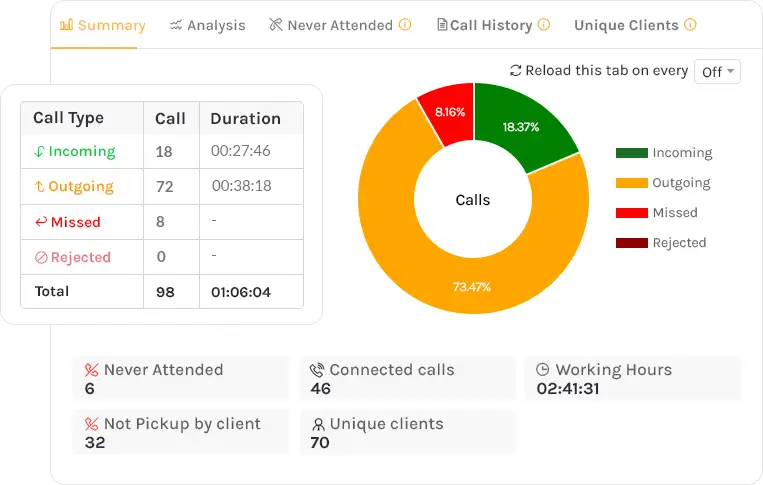
These reports help managers identify gaps that call counts alone cannot reveal.
For example, an employee may make 100 calls in a day, but only a small number may connect. Another employee may make fewer calls but spend more time speaking with potential customers. Looking at call volume alongside connected calls and call duration gives managers a more meaningful view of performance.
Business outcome: Managers can identify employees who need support, understand calling trends, plan better calling schedules and make performance reviews based on actual activity rather than assumptions.
2. Lead Management: Make Sure Enquiries Reach the Right Employees
When leads come from multiple sources, managing them manually can create delays. Enquiries may remain unassigned, get shared with the wrong employee or miss timely follow-ups.
Callyzer brings lead management and calling activity together. Businesses can capture leads from sources such as IndiaMART, Facebook, Instagram and Google Sheets. It also supports integrations with CRM platforms such as Zoho and LeadSquared, as well as API-based connections.
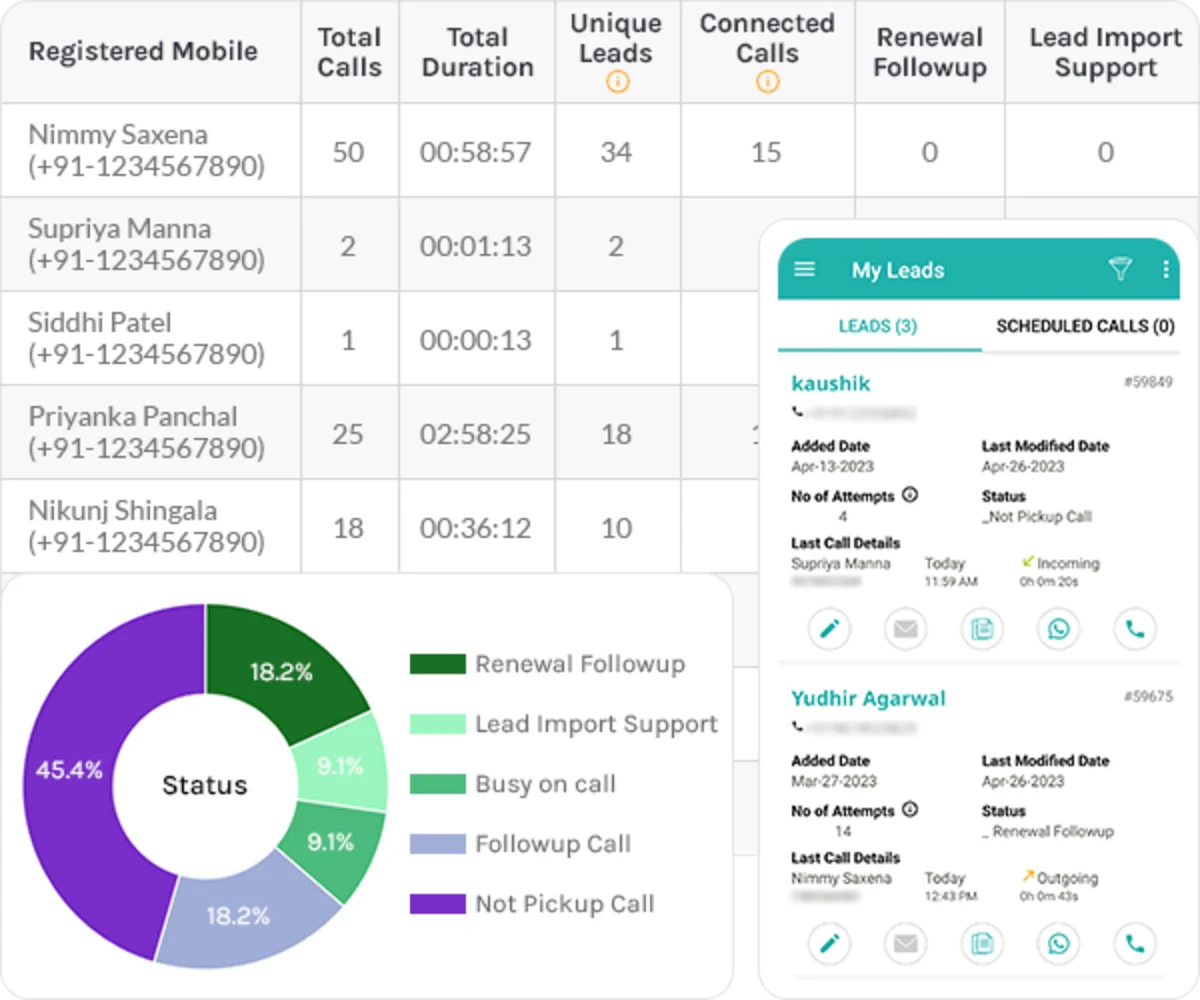
Managers can assign leads to employees, configure automatic lead distribution and review lead status and contact activity.
They can also use lead reports to identify:
- Leads that are yet to be contacted.
- Leads assigned to individual employees.
- Changes in lead status.
- Enquiries that need further follow-up.
This gives managers visibility into what happens after an enquiry enters the business.
Business outcome: Less manual lead handling, clearer ownership of enquiries and better visibility into whether incoming leads are being contacted and followed up on.
3. Missed Call and Follow-up Reports: Reduce Unattended Enquiries
A missed customer call is not necessarily a lost sale. But if nobody notices it or follows up, the customer may contact a competitor instead.
Callyzer provides reports that help managers identify missed and unattended calls. Reports such as Missed & Never Attended help highlight calls that need attention.
Managers can review these reports alongside lead activity to understand whether enquiries have been contacted and followed up on. Employees can also use follow-up reminders to keep pending customer conversations on their schedule.
This is particularly useful for businesses that receive a high volume of enquiries through phone calls. Instead of depending on employees to remember every missed call, managers have a clearer view of which calls need attention.
Business outcome: Fewer overlooked enquiries, more timely follow-ups and better chances of converting customer interest into sales conversations.
4. Call Recordings and AI Call Summaries: Understand What Happens During Customer Conversations
Call reports tell managers how many calls employees make and receive. But they do not explain what happens during those conversations.
Callyzer supports call recording synchronisation, allowing available recordings from employees' devices to be synced to a central dashboard. Managers can review conversations to understand how employees handle enquiries, respond to customer questions and communicate product or service information.
AI Call Summary adds another layer of insight by highlighting key discussion points, customer requirements, quoted prices and other important details from a conversation.
Instead of listening to every recording from beginning to end, managers can use summaries to quickly understand the context of customer conversations and decide which calls need a closer review.
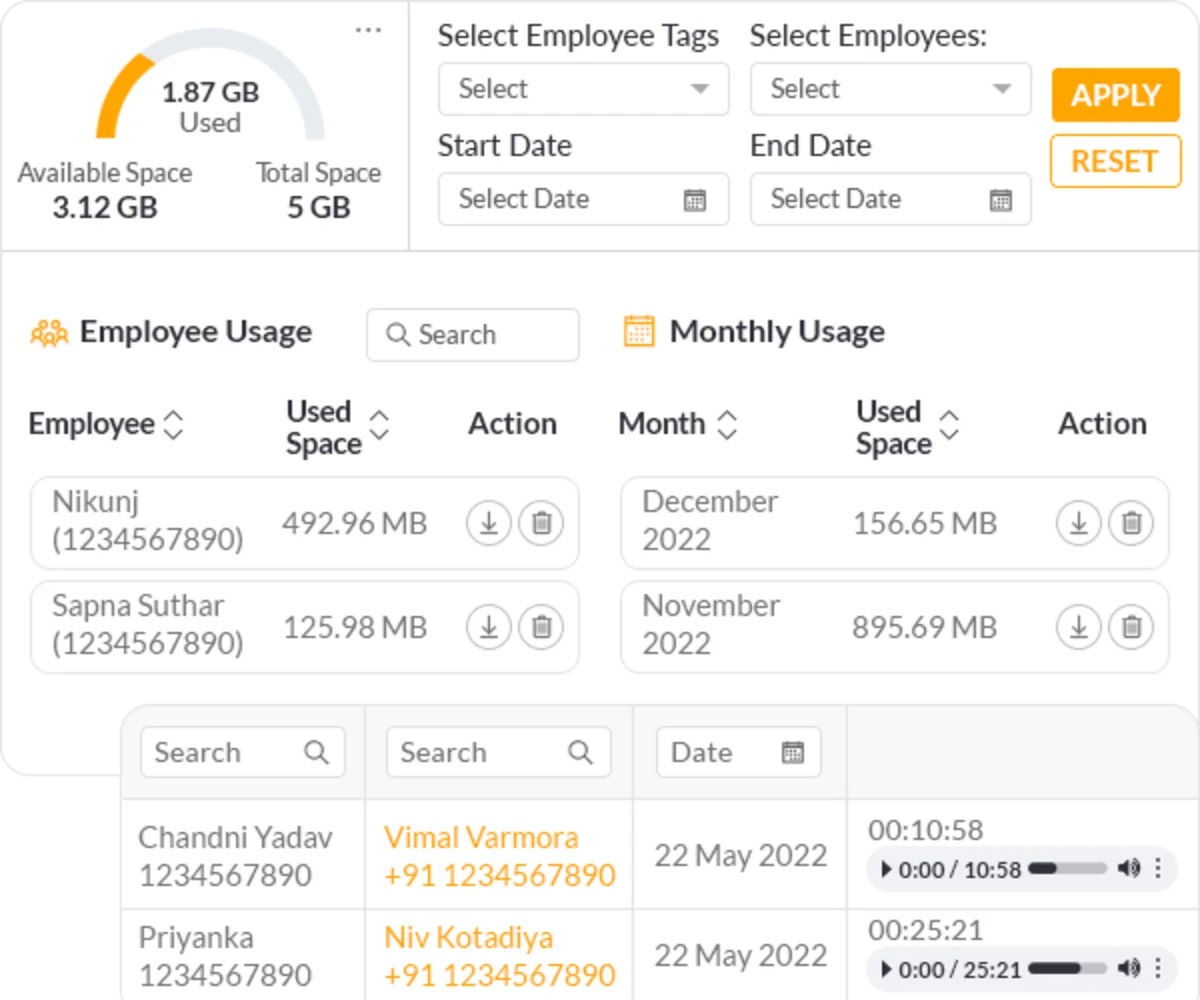
Business outcome: Faster sales call audit and better visibility into customer conversations, more focused employee coaching and a clearer understanding of the questions, concerns and requirements customers raise during calls.
5. Employee Productivity Reports: Understand How Employees Spend Their Working Hours
Call volume alone does not tell the complete story of an employee's working day. Managers also need to understand how much time employees spend on calls and how their calling activity fits into their working hours.
Callyzer provides employee-wise productivity reports that include total working hours, calling duration and idle time. Managers can review these details alongside call counts, connected calls and other activity reports.
For example, if an employee has long working hours but very little calling activity, the manager can investigate what is affecting their productivity. If an employee makes many calls but has a low connection rate, the issue may be related to calling schedules or the quality of the contact list.
Callyzer also provides a report for Idle Time, managers can also track employee's idle time between calls.
These reports help managers move beyond simply counting calls and understand where improvements may be needed.
Business outcome: Better workload planning, more objective performance reviews and the ability to identify productivity gaps before they affect team performance.
Is Callyzer Suitable for Every Type of Sales Team?
Not every sales team needs the same kind of employee monitoring.
Callyzer is designed for businesses whose employees handle customer enquiries, sales conversations and follow-ups over phone calls. It provides visibility into calling activity, lead handling and employee productivity for both office-based and remote teams.
However, Callyzer does not provide GPS-based employee tracking, live location monitoring or field visit tracking.
If your employees spend most of their working day visiting customers, travelling between locations or managing on-ground sales activities, a GPS-based field sales tracking app may be more suitable.
The right solution depends on how your team works. If customer interactions happen primarily over the phone, Callyzer helps you understand the activity behind those conversations and manage the follow-up process more effectively.
How Do You Roll Out a Tracking App Without Hurting Employee Morale?
A tracking app should be introduced gradually, with employees involved from the beginning.
A phased 90-day rollout gives businesses enough time to test the system, address concerns and improve adoption.
| Phase | Focus | Key actions |
|---|---|---|
| Days 1–30 | Prepare and pilot | Define goals and five to seven KPIs. Share the tracking policy. Test the app with a team of five to ten employees and collect feedback. |
| Days 31–60 | Train and expand | Train employees and managers. Introduce the app in stages, resolve setup issues and begin weekly performance reviews. |
| Days 61–90 | Review and improve | Compare results with the initial baseline. Adjust KPIs, use the data for coaching and plan further integrations. |
Before introducing the app, record your existing performance levels.
Useful baseline metrics include lead response time, follow-up rate and the number of daily visits or calls.
These figures will help you understand whether the app is improving your team's performance.
Communication is equally important. Explain what the app records, why the information is needed and how it will be used.
Also share early results, such as the time saved on manual reporting. When employees can see a practical benefit, they are more likely to use the app regularly.
Conclusion
A sales staff tracking app helps businesses move beyond delayed reports and guesswork. It gives managers a clearer view of daily activities, helps employees maintain accurate work records and provides better information for business decisions.
The right solution depends on how your sales team operates. Field teams may need location and visit tracking, while inside sales teams may need call and lead activity reports. Hybrid teams may require a combination of both.
Start by identifying your biggest visibility gaps. Select a few meaningful KPIs, test the app with a small team and review the results regularly.
Most importantly, keep employee monitoring transparent and focused on improving performance.
If your sales team handles customer enquiries over the phone, explore how Callyzer helps monitor business calls and review employee calling activities. You can try Callyzer with a free 15-day trial.
Frequently Asked Questions
1. What is the best app for tracking sales employees?
There is no single best app because the right choice depends on how your sales team works. Here are some options based on different business needs:
- Phone-based sales teams: Callyzer, for call analytics, lead management, call recordings and employee productivity reports.
- Field sales teams: Unolo, for live location tracking, distance travelled, geo-verified visits and field attendance.
- FMCG and distribution teams: Bizom, for sales force automation, beat planning, distributor management and retail execution.
- Teams that need CRM and sales activity management: Zoho CRM, for lead management, customer records, task scheduling and mobile sales access.
- Teams managing leads and field sales operations: LeadSquared, for lead and opportunity management, route optimisation and sales analytics.
- Businesses focused on attendance and HR management: Keka, for GPS-based attendance, geofencing, shift management and payroll.
Before making a decision, shortlist two or three apps, test them with actual employees and compare how well they fit your daily operations.
2. How do you choose a sales employee tracking app?
Choose an app based on your team's requirements. Look for essential features such as activity monitoring, call analytics, lead management, performance reports, CRM integrations, ease of use and data security.
3. How can you monitor employee call logs legally in India?
Inform employees about call monitoring, explain what data is collected and why, and establish clear access and data retention policies. Do not monitor personal data and calls. Ensure your practices comply with applicable Indian data protection and employment laws.
4. What are the benefits of using employee monitoring software?
Employee monitoring software helps businesses improve accountability, understand work patterns, identify productivity gaps, manage workloads and make performance reviews more objective.
5. How can you track sales team performance remotely?
Monitor employee-wise call activity, connected calls, missed calls, calling hours, lead follow-ups and sales outcomes through a central dashboard. Review these metrics regularly to identify performance gaps and support remote employees.
6. How can managers track sales employees' daily activities?
Managers can monitor daily activities such as customer interactions, meetings, field visits, leads assigned, follow-ups completed and tasks pending. They can review these updates alongside sales targets and progress to understand how employees are managing their responsibilities. This helps identify delays, improve accountability and keep the sales team on track.
7. How does employee call tracking improve sales productivity?
Employee call tracking helps identify missed enquiries, delayed follow-ups and gaps in calling activity. Managers can use call reports and recordings to coach employees, improve customer interactions and make better decisions about team performance.