
Most telecalling teams have the same reflex when a lead batch underperforms: blame the data.
By noon someone says "the leads are bad," everyone quietly agrees, the vendor gets questioned, and the next day the same team works a fresh batch the exact same way and wonders why nothing changed.
The problem is almost never the leads themselves. It’s that most teams don’t have a clear way, or the right call management software, to separate a data problem from an operations problem.
There's a difference between a bad lead and a neglected lead. A bad lead was never going to convert no matter what you did. A neglected lead could have converted but never got a fair shot.
Most teams treat both exactly the same, and that's where revenue quietly disappears.
The good news is once you know what to look for, fixing it takes less time than the morning blame session.
Why "Bad Leads" Is Usually the Wrong Diagnosis
Here is something worth understanding about how sales teams process failure.
When a lead converts, the agent gets the credit. When a lead doesn't, the lead gets the blame. This imbalance is common in most teams, and it slowly distorts how performance is judged.
So issues like slow follow-ups, bad routing, duplicate leads, or wrong timing all end up getting blamed on one thing: “bad leads.”
And since lead quality is a marketing problem, operations never have to fix anything.
The Pattern Worth Knowing: In many underperforming batches, 30–40% of “not contacted” leads were never really given a fair chance, they weren’t called at the right time or by the right agent.
The number reported as "not connected" is not the same as the number that genuinely could not be reached.
One is a data problem. The other is a process problem. They look identical on a surface-level report.
The faster you can separate those two, the faster you stop wasting budget and start fixing what's actually broken.
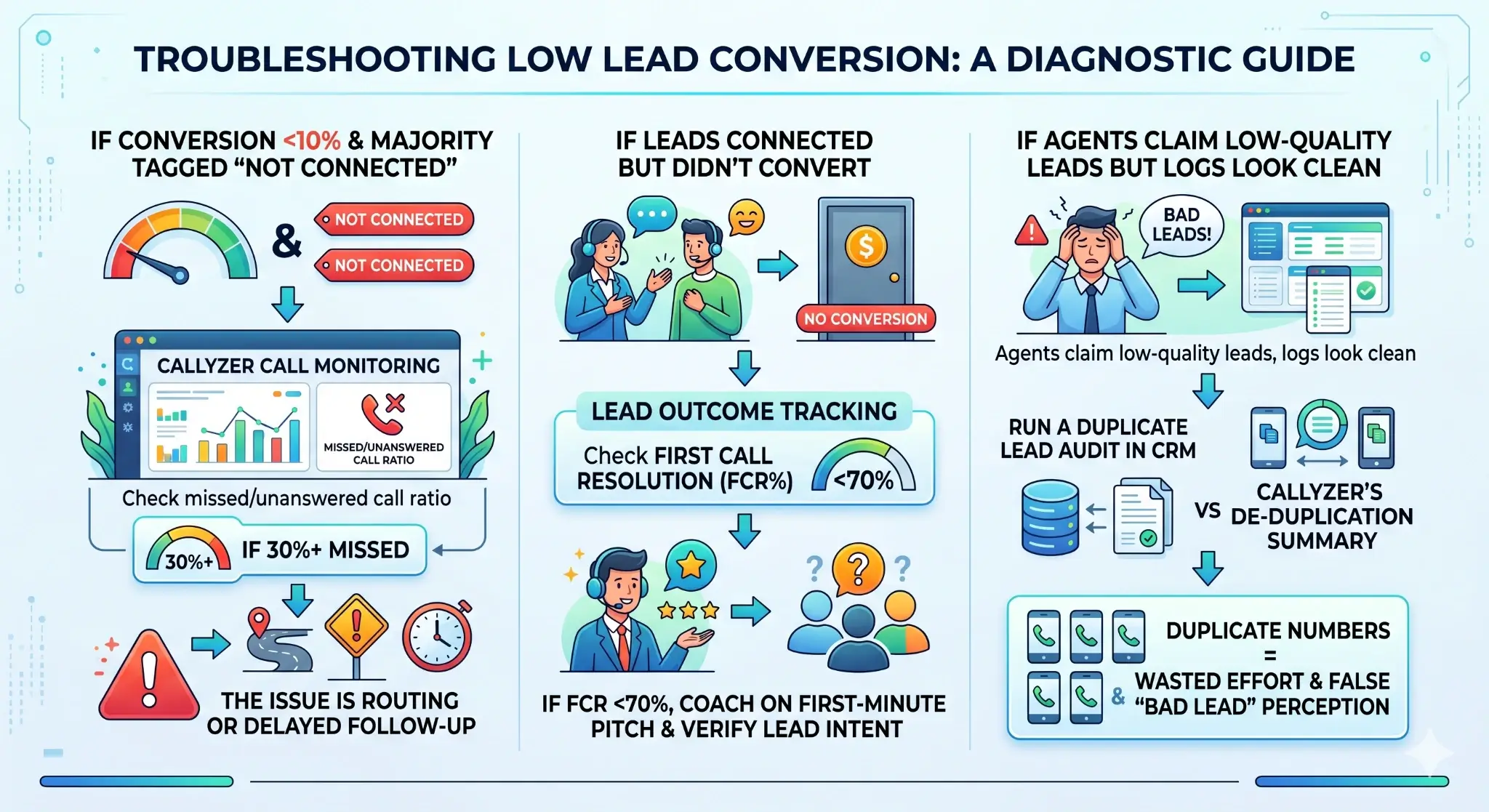
The Three Failure Modes (and How to Spot Each One)
When a batch underperforms, it's almost always one of three things. Work through them in order.
Failure Mode 1: Leads never got a real chance
Check: Your missed and unanswered call ratio. If it's above 30%, the issue is upstream of the call itself.
Look for: Routing gaps: leads assigned to agents who were off-shift or in another call.
A single misconfigured routing rule can silently swallow 40% of a batch.
Also look at time-to-first-call. If leads are sitting more than 15 minutes before the first attempt, you're already losing them. Prospect intent decays fast, especially for inbound or form-fill leads.
The fix: Redistribute uncontacted leads to active agents immediately and set a hard alert for any lead untouched beyond 10 minutes of assignment.
Failure Mode 2: Leads connected but the conversation failed
Check: First call resolution rate. Below 70% consistently means the problem is in the opening pitch or in a mismatch between what the lead expects and what the agent is offering.
Look for: This is where most managers stop digging, and they shouldn't.
Pull call recordings from the connected-but-didn't-convert segment. Nine times out of ten, agents are losing the lead in the first 60 seconds, either by leading with a product instead of a problem, or by calling a lead that was never qualified for that product in the first place.
The fix: Coach specifically on the first 60 seconds.
Retrain on lead qualification before pitching. Review whether the lead source intent actually matches the product being sold. A lead from a home loan ad being pitched a credit card is not a bad lead. It's a wrong-audience problem.
Failure Mode 3: The data itself is contaminated
Check: Duplicate numbers across your CRM. This one is underestimated in almost every team we've worked with.
Look for: A prospect who gets called by three different agents on three consecutive days has not been contacted three times. They've been annoyed three times.
Duplicate leads don't just waste effort. They actively damage your brand with the very prospects you're trying to convert. When agents see these in the system, they also start believing the data is generally bad, even when it isn't.
The fix: Run a deduplication sweep before any batch goes live, not after. Merge or reassign duplicates and add ownership locking so two agents cannot be working the same number simultaneously.
A Common Mistake: Most teams run these checks after a bad day, when they're already in damage-control mode. The smarter play is to build this as a morning ritual before calls begin. Five minutes of triage at 9 AM is worth two hours of troubleshooting at 4 PM. |
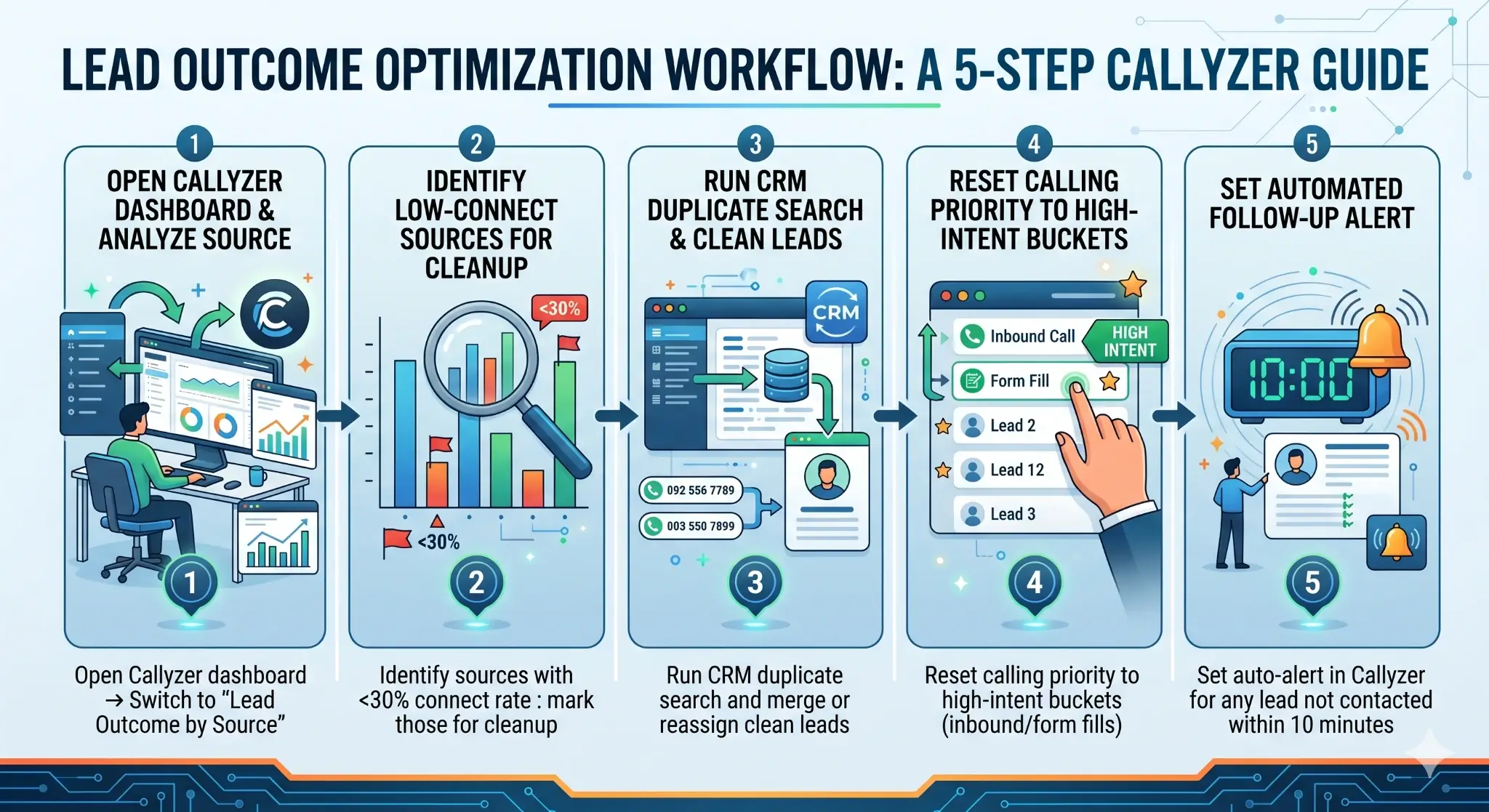
The 5-Minute Triage Checklist
Run this at the start of each calling session. It takes under five minutes and prevents most of the avoidable failures described above.
- Open your call dashboard and filter by Lead Outcome by Source. Any source showing less than 30% connect rate should be pulled out and cleaned before your agents spend another minute on it. Calling bad numbers is not a hustle problem, it's a data hygiene problem.
- Before the session starts, confirm every agent in your routing config is actually online and available. This sounds obvious but it's the most common silent killer. A single off-duty agent sitting in an active queue can swallow dozens of leads without anyone noticing until the end of day.
- Run a duplicate check on the batch. If your CRM does not do this automatically, do it manually. Two agents calling the same prospect on the same day does not double your chances, it halves your credibility with that prospect and wastes one agent's entire effort.
- Order your batch by intent, not by how leads arrived. Inbound requests and form fills go first. Cold outbound goes last. Put your best agents on the hottest leads at the start of the day when energy is high, not after they've already ground through two hours of cold calls.
- Set a 10-minute callback alert for every lead that doesn't connect on the first attempt. Not 30 minutes, not at the end of day. Make sure it’s Ten minutes. A prospect who just filled out a form or just saw your ad is thinking about you right now. Wait an hour and that window is mostly gone.
Research on B2C calling shows callback within 10 minutes is 6 to 8 times more likely to connect than one made after 60 minutes.
What to Expect: Teams that run this consistently report pickup rate recovery within the same day and a 5 to 8 percent conversion improvement within 48 hours, without changing their lead source or increasing ad spend. |
What the Numbers Actually Showed
A real estate team in Pune was running 200 fresh leads daily and consistently hitting poor conversion numbers. The internal consensus was that the vendor data was weak. Before pulling the source, we ran a 24-hour audit using Callyzer's call monitoring software.
33 duplicate leads being called by multiple agents. 60% of calls were absorbed by one agent while two others sat idle. Zero callback rules in place for missed first-attempt calls.
The lead data was fine. The operation had no visibility into itself.
We did three fixes: remove duplicates, rebalance load across all three active agents, add a 10-minute callback trigger. By the end of week, conversions were up 9 percent. The lead vendor never got replaced.
This pattern repeats across industries. Fintech, insurance, edtech: the numbers are always slightly different but the structure of the problem is almost always the same. Visibility is missing, so blame fills the gap.
How Callyzer Fits Into This
You can run this triage using spreadsheets and disconnected tools. But most teams don’t do it consistently because it’s slow and easy to skip.
Callyzer removes that friction by making call activity and data quality visible in one place.
Real-time visibility (focused on calling activity)
- See call outcomes as they happen, connected, missed, or unanswered
- Track agent calling activity throughout the day
- Identify missed follow-ups and delayed callbacks early, not at the end of the day
Cleaner data without manual effort
When you import leads into Callyzer, it automatically checks mobile numbers against existing records and flags duplicates.
Instead of forcing a merge, it gives you control:
- Overwrite the existing data
- Ignore the duplicate entry
This means:
- Your team avoids calling the same prospect multiple times
- Follow-ups stay clear and traceable, even across agents
- Your data stays clean without manual cleanup or confusion
By handling duplicates at the import stage, Callyzer keeps your pipeline focused on real opportunities and prevents overlap in follow-ups.
No setup complexity
- SIM-based, no PBX or hardware required
- Works on the phones your team already uses
- Starts at ₹175 per phone per month
What earlier took multiple tabs and constant back-and-forth becomes a quick glance at what’s happening and what needs to be fixed.
Struggling with poor lead quality?
Try the Lead Quality Crash-Test to quickly identify high-value leads, boost conversions, and save your sales team time.
What Good Triage Actually Looks Like Over Time
Most sales guides won’t tell you this: lead quality isn’t fixed. It depends on when you call, who calls, and how the first 60 seconds go. The same lead that doesn’t convert on a cold Monday morning can easily close on a warm follow-up Tuesday afternoon.
Worth Building Into Your System
Instead of marking every failed call as “not interested,” add a simple tag and a short note for each call.
For example:
- “Busy, asked to call later”
- “Connected, wrong timing”
- “Number unreachable”
These small details make a big difference.
When you call the same lead again, you already know the context. You’re not starting from scratch. The conversation feels more relevant, and your chances of conversion improve.
Over time, these tags also show patterns:
- Which leads need follow-ups
- Where agents are losing conversations
- Which sources work better on first call vs follow-up
With Callyzer, adding tags and notes is quick and part of your normal calling flow, so your team actually does it consistently without extra effort.
The Real Takeaway
Lead quality is not a marketing metric. It's an operations problem that consistently gets mislabeled as one. The fastest way to improve conversions is not to find better leads. It's to make sure the leads you already have are being worked correctly.
Most teams are sitting on recoverable performance. They just can't see it yet.
Next Read
Most deals aren’t lost during the call, they’re lost after it. Missed follow-ups and delayed callbacks quietly kill conversions.